VAT maths guide
How to Calculate VAT: Add or Remove VAT, the One Sixth Rule and HMRC Rounding
How to calculate VAT on any price
- Find the priceIs VAT included or not?
- Check the rate20%, 5% or 0%
- Use the formula× 1.2 to add, ÷ 1.2 to remove
- Round the penniesDown on the invoice total
- Check itVAT is one sixth of a gross price
A supplier quotes £480 including VAT, a customer wants a price without VAT, and you need to know the VAT figure for your return. Most people reach for 20% of the total, get the wrong answer, and only notice when the numbers will not add up.
This guide gives you a calculator for instant answers, then the three formulas behind it, the one sixth rule HMRC itself uses, and the rounding rules that decide the last penny. Once you know how to calculate VAT this way, you can check any invoice in seconds, with or without a calculator.
VAT calculator: add or remove VAT in seconds
Type an amount, choose whether it already includes VAT, and pick the rate. The calculator shows the net price, the VAT and the gross price, and the working behind them.
VAT calculator
Add VAT to a net price or take it off a gross price
The working
£480.00 ÷ 1.2 = £400.00, so the VAT is £80.00, which is one sixth of £480.00.
Figures are rounded to the nearest penny. On invoices, HMRC lets you round the total VAT down to the nearest penny instead.
Key facts
- Add VAT at 20%
- Multiply the net price by 1.2
- Remove VAT at 20%
- Divide the gross price by 1.2
- VAT fraction at 20%
- One sixth of the VAT inclusive price
- Reduced rate 5%
- Multiply or divide by 1.05; VAT is one twenty first
- Invoice rounding
- Total VAT can be rounded down to the penny
- Common mistake
- Taking 20% off a gross price overstates VAT
How to calculate VAT: the three formulas
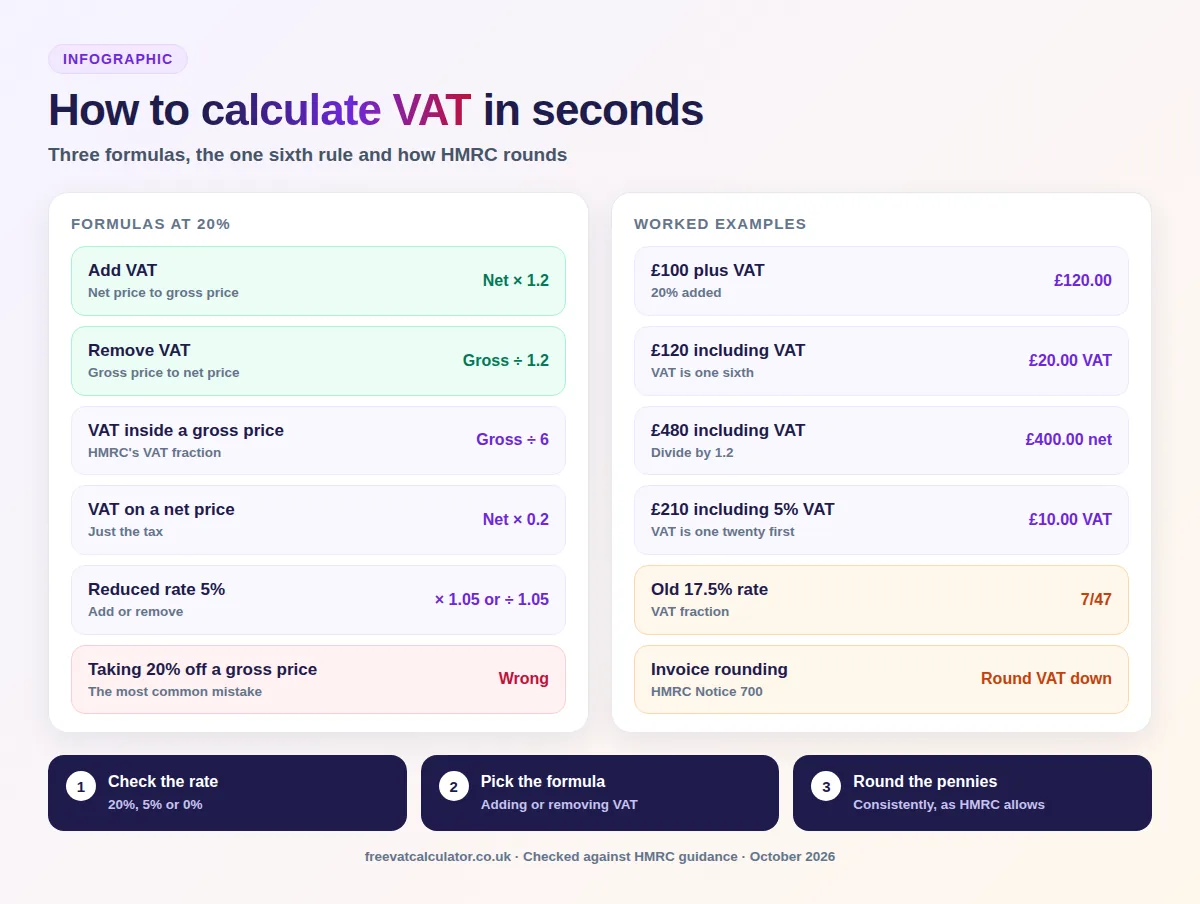
Every VAT calculation is one of three jobs: adding VAT to a net price, removing it from a gross price, or finding just the VAT inside a gross price. At the standard 20% rate, these are the formulas.
| What you want | Formula | Example with £100 net |
|---|---|---|
| Gross price from a net price | Net × 1.2 | £100 × 1.2 = £120 |
| Net price from a gross price | Gross ÷ 1.2 | £120 ÷ 1.2 = £100 |
| VAT inside a gross price | Gross ÷ 6 | £120 ÷ 6 = £20 |
| VAT on a net price | Net × 0.2 | £100 × 0.2 = £20 |
How to add VAT to a price
To add VAT, multiply the net price by 1.2 for the standard rate, or by 1.05 for the reduced rate. A £250 job plus VAT is £250 × 1.2, which is £300, made up of £250 for the work and £50 of VAT. If you only want the VAT, multiply by 0.2 instead.
How to work out VAT from a gross amount
To calculate VAT from gross figures, or to remove VAT from a price, divide the gross amount by 1.2. A £480 quote including VAT is £480 ÷ 1.2, which is £400 excluding VAT, so the VAT amount is £80. This is often called a reverse VAT calculation, and it is the one people get wrong most often.
The one sixth rule: HMRC’s VAT fraction
HMRC calls the share of a VAT inclusive price that is VAT the VAT fraction. You find it by dividing the rate by 100 plus the rate, so at 20% it is 20 ÷ 120, which is one sixth. That is why the VAT inside £480 is simply £480 ÷ 6, or £80.
HMRC’s own example uses a £2.40 item: the VAT inside it is 40p, which is a sixth of the price, not 20% of it. The fraction is quick to use in your head, and it works the same way for any rate.
How to calculate VAT at the 5% reduced rate
At the reduced rate, multiply by 1.05 to add VAT and divide by 1.05 to remove it. The VAT fraction is 5 ÷ 105, which is one twenty first, so the VAT inside a £210 bill at 5% is £210 ÷ 21, or £10.
Why you should never take 20% off a VAT inclusive price
The most common VAT mistake is taking 20% off a price that already includes VAT. On £120 including VAT, 20% off gives £96 as the price without VAT and £24 as the VAT, but the correct figures are £100 and £20. The error overstates the VAT by £4 on every £120, which adds up quickly across a quarter of invoices.
The reason is that VAT is 20% of the net price, not of the gross price. Once VAT is added, it makes up a sixth of the total, so always divide by 1.2, or by 6 for the VAT alone.
VAT calculation examples
These worked examples cover the amounts people check most often. Each one uses the standard rate of 20%, rounds the price without VAT to the nearest penny and treats the VAT as the difference, so every row adds up.
| Amount | Without VAT | VAT | With VAT |
|---|---|---|---|
| £50 plus VAT | £50.00 | £10.00 | £60.00 |
| £500 plus VAT | £500.00 | £100.00 | £600.00 |
| £1,000 plus VAT | £1,000.00 | £200.00 | £1,200.00 |
| £99.99 including VAT | £83.33 | £16.66 | £99.99 |
| £480 including VAT | £400.00 | £80.00 | £480.00 |
| £2,500 including VAT | £2,083.33 | £416.67 | £2,500.00 |
UK VAT rates you need to know
Before you calculate VAT, check which VAT percentage applies, because the same formula with the wrong rate gives the wrong answer. Most goods and services are standard rated, but a long list sits at 5% or 0%.
| Rate | Applies to | Examples |
|---|---|---|
| Standard 20% | Most goods and services | Electronics, adult clothing, restaurant meals, most professional services |
| Reduced 5% | Some goods and services | Children’s car seats, home energy such as gas, some mobility aids for people over 60 |
| Zero 0% | Taxable, but at nil | Most food, children’s clothes, books and newspapers |
| Exempt | No VAT charged | Insurance, most financial services, postage stamps |
| Outside the scope | Not part of the VAT system | Voluntary donations to charity, statutory fees |
Zero rated and exempt are not the same thing. Zero rated sales count towards the £90,000 registration threshold and let you reclaim VAT on related costs, while exempt sales generally do not. Two temporary changes also matter in 2026: domestic electricity in Great Britain is 0% from 1 October 2026 to 31 March 2027, explained in our guide to 0% VAT on electricity, while the 5% rate on certain children’s meals and family attractions applied until 1 September 2026 and has now ended.
Historic VAT rates and fractions
You may still need old rates to correct an earlier return or check an old invoice. The standard rate has changed three times since 2008, and each rate has its own VAT fraction.
| Period | Standard rate | VAT fraction |
|---|---|---|
| Before 1 December 2008 | 17.5% | 7/47 |
| 1 December 2008 to 31 December 2009 | 15% | 3/23 |
| 1 January 2010 to 3 January 2011 | 17.5% | 7/47 |
| From 4 January 2011 | 20% | 1/6 |
HMRC rounding rules for VAT
VAT calculations often produce fractions of a penny, and HMRC’s VAT guide, Notice 700, sets out how to round them. You can choose a method, but you must use it consistently.
Rounding the VAT total on an invoice
If you work out VAT on the invoice as a whole, you can round the total VAT down to the nearest whole penny and ignore any fraction. This concession is for invoice traders, and only where the VAT you charge customers is the VAT you pay to HMRC.
Rounding line by line
If you calculate VAT on each line, you can either round each line down to the nearest 0.1p, so 86.76p becomes 86.7p, or round to the nearest 1p or 0.5p, so 86.76p becomes 87p. The invoice total can still then be rounded down to a whole penny.
Rounding unit prices
When VAT is worked out per unit, for example on a price list, you can calculate to four decimal places and round to three, or round to the nearest 1p or 0.5p. With the second method, a standard or reduced rated item must never be rounded down to nil.
Rounding rules for retailers
Most retailers use a retail scheme, which applies the VAT fraction to total takings, so these rules rarely affect them. Retailers who do calculate VAT line by line must not always round down, but may round each figure up or down to the nearest penny.
How to calculate VAT in Excel or Google Sheets
The same formulas work in any spreadsheet. With your amount in cell A2, use these:
| What you want | Formula at 20% | Formula at 5% |
|---|---|---|
| Add VAT | =A2*1.2 | =A2*1.05 |
| Remove VAT | =A2/1.2 | =A2/1.05 |
| VAT inside a gross amount | =A2/6 | =A2/21 |
| Round to the penny | =ROUND(A2/6,2) | =ROUND(A2/21,2) |
If you keep the rate in its own cell, say B2 as 20%, use =A2*(1+B2) to add VAT and =A2/(1+B2) to remove it. To follow HMRC’s invoice concession, swap ROUND for ROUNDDOWN on the VAT total.
VAT on discounts and delivery charges
An unconditional discount reduces the price before VAT, so you charge VAT on the discounted amount. For a prompt payment discount, VAT is due on the amount the customer actually pays, a rule in place since April 2015, and the invoice must make the terms clear.
Delivery that is part of the contract takes the same VAT rate as the goods, even if it is shown separately, so delivering zero rated food is zero rated. Optional delivery under a separate contract is its own supply and is standard rated. For invoices with more than one rate, our invoice VAT calculator works out each line.
How to calculate the VAT you owe HMRC
On a standard VAT return, the VAT you owe is the VAT you charged on sales, your output tax, minus the VAT you paid on business costs, your input tax. If you charged £6,000 and paid £1,500, you owe HMRC £4,500, while a negative figure means HMRC repays you.
Two schemes work differently. Under the Flat Rate Scheme, you pay a fixed percentage of your VAT inclusive turnover, so a business on 11% that bills £1,200 pays £132, and our flat rate calculator compares it with standard VAT. Retailers using the point of sale scheme apply the VAT fraction to their takings, dividing standard rated sales by 6 and reduced rate sales by 21.
Want the full calculator?
Our main VAT calculator adds or removes VAT at any rate, with a breakdown you can copy.
How to calculate VAT FAQs
These are the questions people ask most when they work out VAT. The formulas and tables above cover each one in more detail.
How do I calculate 20% VAT?
Multiply the net price by 0.2 for the VAT, or by 1.2 for the total including VAT. £300 plus VAT is £60 of VAT and £360 in total.
How do I take VAT off a price?
Divide the price including VAT by 1.2 at the standard rate, or by 1.05 at the reduced rate. £600 including VAT is £500 before VAT.
What is the VAT fraction?
It is the share of a VAT inclusive price that is VAT, found by dividing the rate by 100 plus the rate. At 20% it is one sixth, and at 5% it is one twenty first.
Why is VAT not 20% of the total price?
Because VAT is 20% of the price before VAT. Once it is added, it makes up a sixth of the total, which is about 16.67%.
Do I round VAT up or down?
On an invoice you can round the total VAT down to the nearest penny. Line by line, you can round down to 0.1p or to the nearest 1p or 0.5p, as long as you are consistent.
For anything more complex, such as mixed rates or a retail scheme, HMRC’s VAT guide, Notice 700, has the full rules. An accountant can also check how a scheme applies to you.
You now know how to calculate VAT in three ways, why taking 20% off a gross price is wrong, which rate applies and how HMRC rounds the last penny. All the information you need to check any price or invoice is above.
Sources: HMRC, VAT rates; HMRC, VAT rates on different goods and services; HMRC VAT Notice 700; HMRC VAT Notice 700/24; HMRC, Flat Rate Scheme; HMRC, point of sale scheme; Revenue and Customs Brief 10 (2026). This page is general information, not tax advice.