MTD software guide
Making Tax Digital Software: Free and Paid MTD Software for Sole Traders and Landlords
Getting ready for Making Tax Digital
- Check if it appliesIncome over £50,000, £30,000 or £20,000
- Choose softwareFree, paid or bridging
- Keep digital recordsAmount, date and category
- Send updatesFour quarterly updates a year
- File the tax returnBy 31 January
HMRC has written to say you must keep digital records and send quarterly updates, and suddenly every accounting app claims to be the answer. Some are free, some cost £20 a month, some only work with one bank, and a few cannot yet file the final tax return at all. Paying for the wrong one, or picking a free one that falls short in January, is easy to do.
This guide compares the free and paid options side by side, with the conditions and prices we checked on each provider’s own site on 19 October 2026. It also explains what the software must do, how bridging software works for spreadsheet users, and how to choose Making Tax Digital software that fits a sole trader, a landlord or both.
Free MTD software compared
These products offer Making Tax Digital for Income Tax at no cost, but most come with a catch. Read the conditions column before you sign up.
Free MTD software finder
Filter the free options to the ones that fit you
8 free options
All free options are shown in the table below.
| Software | Who it suits | Type | Conditions |
|---|---|---|---|
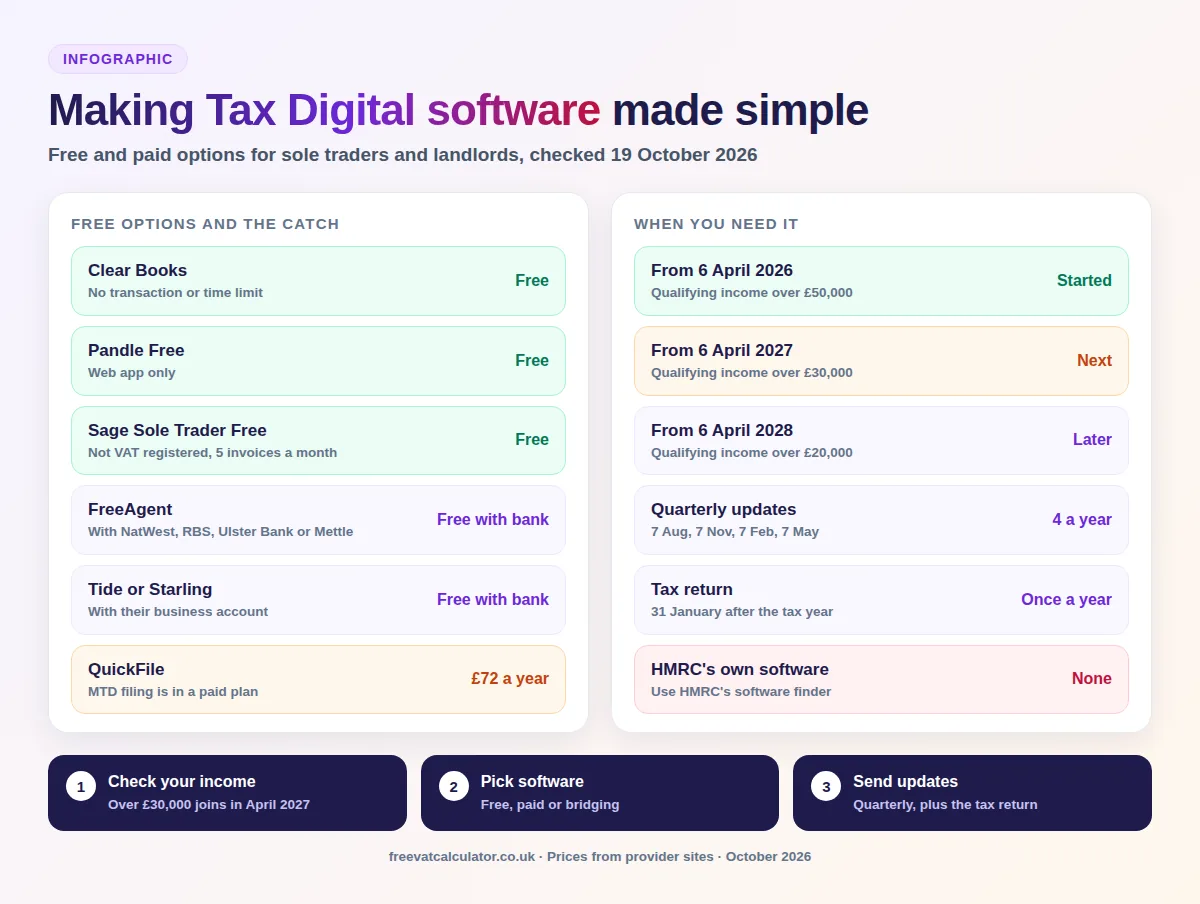
| Clear Books free MTD plan | Sole traders and landlords | Bookkeeping | No transaction or time limit; covers MTD for Income Tax only, not VAT returns |
| Pandle Free | Sole traders and landlords | Bookkeeping | Quarterly updates with no usage limits; web app only |
| Sage Sole Trader Free | Sole traders, with landlord records included | Bookkeeping | Not VAT registered; one user, one bank account and up to five invoices a month |
| FreeAgent with NatWest, RBS, Ulster Bank or Mettle | Sole traders and landlords | Bookkeeping | Free while you keep a business account with one of these banks; Mettle needs one transaction a month |
| Tide | Sole traders and landlords | App | Free with a free Tide business account or a connected bank; sends quarterly updates and the tax return |
| Starling Accounting Essentials | Sole traders | Built into the bank app | Free for Starling sole trader accounts; other banks’ transactions entered by hand; final tax return marked as coming soon |
| ANNA spreadsheet upload | Spreadsheet users | Bridging | Free upload for quarterly updates; the year end return is not covered on its page |
| Coconut | Sole traders and landlords | Bookkeeping or bridging | Free for 24 months for new Zempler bank customers only |
QuickFile is often listed as free, but its Making Tax Digital for Income Tax filing sits in its paid Power User plan, at £72 a year including VAT. Free plans change often, so check the provider’s own page before you commit.
Key facts
- Started
- 6 April 2026, qualifying income over £50,000
- Next step
- 6 April 2027, qualifying income over £30,000
- HMRC software
- None of its own; it lists compatible products
- Free options
- Clear Books, Pandle, Sage, Tide and bank linked tools
- Spreadsheets
- Allowed with bridging software
- First year
- No points for late quarterly updates in 2026 to 2027
Paid making tax digital software and what it costs
Paid software adds things free plans usually limit, such as invoicing, more bank feeds, VAT returns, receipts capture or support. Prices below exclude VAT unless stated, and several providers offer large discounts for the first few months. The cheapest paid plans start at about £5 a month, while QuickBooks also sells sole trader plans that support MTD, though we could not confirm its current prices.
| Software | Price | Who it suits |
|---|---|---|
| Pandle Pro | £5 a month plus VAT | Sole traders and landlords |
| Clear Books paid plans | From £5 a month | Businesses that also need VAT or invoicing |
| Sage Sole Trader | £7 a month plus VAT | Sole traders |
| Xero Simple and Ignite | £7 or £18 a month plus VAT | Simple suits businesses not registered for VAT; Ignite adds VAT returns |
| Hammock | £8 to £31.50 a month plus VAT, by number of properties | Landlords |
| FreeAgent without a partner bank | £19 a month sole trader, £10 a month landlord, plus VAT | Sole traders and landlords |
| Tide Accounting | £13.99 a month plus VAT | Users who also need VAT returns |
| Coconut | £12.99 a month or £129.99 a year | Sole traders and landlords |
| TaxCalc MTD Quarterly Filer | From £24 a year | Spreadsheet users; the tax return needs a separate product |
| QuickFile Power User | £72 a year including VAT | Sole traders and landlords |
Do you need MTD software yet?
Making Tax Digital for Income Tax applies to sole traders and landlords based on their qualifying income, which is gross self employment and property income added together. It started on 6 April 2026 and widens in two more steps.
| From | Qualifying income over | Based on |
|---|---|---|
| 6 April 2026 | £50,000 | Your 2024 to 2025 tax return |
| 6 April 2027 | £30,000 | Your 2025 to 2026 tax return |
| 6 April 2028 | £20,000 | Your 2026 to 2027 tax return |
HMRC expected about 864,000 people to be in scope from April 2026, and by August 2026 about 570,000 had signed up. In October 2026 it estimated a further 1,077,000 sole traders and landlords will join in April 2027. If your income is £20,000 or less, you do not need to use it at all.
- 864,000Expected in scope from April 2026
- 1,077,000Expected to join in April 2027
- £20,000Income at or below this is exempt
What MTD software has to do
Compatible software must do three jobs. It keeps digital records of your self employment and property income and expenses, with the amount, date and category of each one. It sends a quarterly update to HMRC four times a year, and it submits your tax return by 31 January after the tax year.
Other income, such as dividends or savings interest, goes on the tax return through the software but does not need digital records. The first MTD tax return, for 2026 to 2027, is due by 31 January 2028.
Types of making tax digital software
Products fall into three groups, and the right one depends on how you keep your records today.
Bookkeeping software
Full bookkeeping software keeps your records, connects to your bank and handles every MTD submission in one place. It suits anyone starting fresh or tired of spreadsheets, and most free plans above are this type.
MTD bridging software for spreadsheets
Bridging software connects to records you already keep, usually an Excel or Google Sheets spreadsheet, and sends the quarterly updates for you. The spreadsheet and the bridging product must be digitally linked, for example through linked cells, a CSV import or a file upload, and retyping figures after they are sent is not allowed. Some bridging tools do not file the final tax return, so you may need a second product for January.
Banking apps with MTD built in
Some business bank accounts now include MTD tools in the app, such as Starling, Tide, Mettle through FreeAgent and NatWest. They are convenient and often free, but they work best when all your business money goes through that one account.
Does HMRC provide free MTD software?
No. HMRC does not make its own Making Tax Digital software and does not recommend any product. Instead, it runs a software finder on GOV.UK that lists every compatible product and lets you narrow the list down.
How to use HMRC’s MTD software list
The finder asks about your income sources, such as self employment, UK property or foreign property, and any other income you report. It also asks whether you want to create new records or connect to records you already keep, and about your accounting period. It then shows the products that match, including free ones, and you can check whether your current software already works.
Best MTD software for sole traders
There is no single best product, but your situation narrows the choice quickly. These are the sensible starting points:
- Simple business, no VAT: Clear Books, Pandle Free or Sage Sole Trader Free cost nothing.
- Bank with NatWest, RBS, Ulster Bank, Mettle, Tide or Starling: try the free tool linked to your account first.
- Happy with your spreadsheet: use bridging software, and check it can also send the tax return.
- VAT registered: pick software that handles both MTD for VAT and Income Tax, such as a paid plan.
- Lots of invoices or receipts: paid bookkeeping software saves time with bank feeds and receipt capture.
Best MTD software for landlords
Landlords need software that records income and costs for each property and handles jointly owned property correctly. Free options that cover property income include Clear Books, Pandle Free, Sage Sole Trader Free, Tide and FreeAgent through a partner bank.
Dedicated landlord tools such as Hammock price by the number of properties and track rent, deposits and costs per property. If you are both a sole trader and a landlord, choose a product that covers both income types in one account, or check that two products can work together.
How to choose MTD software
Making tax digital software is only worth using if it covers everything you need to file. Before you sign up, check each product against this list:
- it appears on HMRC’s software finder for your income types
- it sends quarterly updates and the final tax return, not just one of them
- the free plan has no limits you will hit, such as bank accounts or invoices
- it connects to your bank, or imports your spreadsheet
- it handles VAT returns too, if you are registered
- your accountant can use it, if they file for you
- you can export your records, which you must keep for five years after the 31 January deadline
MTD quarterly update deadlines
Each update covers the tax year so far, and you must send one even if a quarter had no income or expenses. These are the deadlines for the standard quarters.
| Quarter | Update due |
|---|---|
| 6 April to 5 July | 7 August |
| 6 July to 5 October | 7 November |
| 6 October to 5 January | 7 February |
| 6 January to 5 April | 7 May |
| Tax return for the year | 31 January after the tax year |
You can choose calendar quarters starting on 1 April instead, if your software supports them. VAT registered businesses also have separate VAT return deadlines, which do not change.
MTD penalties in the first year
Late submissions earn penalty points, and four points bring a £200 penalty, with another £200 for each later miss. For the 2026 to 2027 tax year, HMRC is not giving points for late quarterly updates, so the first year is a soft landing, but late tax returns and late payments are still penalised.
Late payment penalties are 3% at day 15 and a further 3% at day 30, then 10% a year, rising to 4% for each stage from 2027 to 2028. In the first year only, HMRC gives 30 days instead of 15 before the first late payment penalty.
Can you get an exemption?
You are exempt automatically if your qualifying income is £20,000 or less. You can also apply if you are digitally excluded, meaning you cannot reasonably use software because of age, health, disability, religious beliefs or no internet access where you live or work. Not knowing how to use software, or not wanting to pay for it, does not count.
You apply by phone or letter to HMRC’s Self Assessment helpline, and HMRC aims to reply within 28 days. You can appeal if it says no.
MTD software for VAT
All VAT registered businesses have had to keep digital records and file VAT returns through MTD software since April 2022, whatever their turnover. Many free Income Tax plans do not include VAT returns, so check before you choose. Our guide to Making Tax Digital for VAT and Income Tax covers both regimes.
VAT registered as well?
See the VAT return deadlines for every quarter, or work out a bill with the VAT calculator.
Making Tax Digital software FAQs
These are the questions sole traders and landlords ask most about MTD software. The comparison tables above give the detail on each product.
Is there free MTD software?
Yes. Clear Books, Pandle, Sage Sole Trader Free, Tide, and FreeAgent through NatWest, RBS, Ulster Bank or Mettle all had free options when we checked, each with its own conditions.
Can I keep using Excel for Making Tax Digital?
Yes, with bridging software that links your spreadsheet to HMRC. The link must be digital, so copying figures by hand into another product is not allowed.
Does HMRC give you free software?
No. HMRC does not provide its own product, but its software finder lists compatible ones, including free versions.
What is the best MTD software for sole traders?
It depends on your bank, your records and whether you are VAT registered. A free bank linked tool or a free bookkeeping plan suits most simple businesses.
Do I need MTD software if I earn under £30,000?
Not until April 2028 if your qualifying income is over £20,000. Income of £20,000 or less is exempt.
Can my accountant choose the software?
Yes, and many accountants already support particular products. Ask them before you sign up, so they can file for you without extra cost.
Prices and free plans change often, so check the provider’s site and HMRC’s software finder before you decide. Your accountant can also tell you which products they support.
You now know which MTD software is free, what paid plans cost, how bridging software works and which type suits a sole trader or landlord. All the information you need to pick software before your first deadline is above.
Sources: HMRC, when you need to use MTD for Income Tax; HMRC, choose the right software; HMRC software finder; HMRC, quarterly updates; HMRC, digital records; HMRC, MTD penalties; HMRC, exemptions; HMRC news, October 2026; provider pricing pages checked 19 October 2026. This page is general information, not tax advice.