VAT payment guide
How to Pay VAT: Pay Your VAT Bill to HMRC Online, by Card or Direct Debit
How to pay your VAT bill on time
- Check the billAmount and deadline in your VAT account
- Pick a methodOne that arrives before the deadline
- Use the referenceYour 9 digit VAT number
- Pay HMRCHMRC VAT, 08 32 00, 11963155
- Confirm it landedKeep your bank confirmation
You have filed your VAT return, the bill is sitting in your online account, and the deadline is a few days away. Now you have to pick a payment method, find the right bank details and hope the money lands in time, because even one day late can start the penalty clock. If cash is tight this quarter, the worry is even bigger.
This guide shows every way to pay, how long each one takes to reach HMRC, the exact bank details and reference to use, and what to do if you cannot pay in full. Everything is checked against HMRC guidance in October 2026, so you can pay VAT once, correctly and on time.
Pay VAT at a glance
The quickest safe choice depends on how close the deadline is. This table compares the options HMRC accepts for a VAT bill.
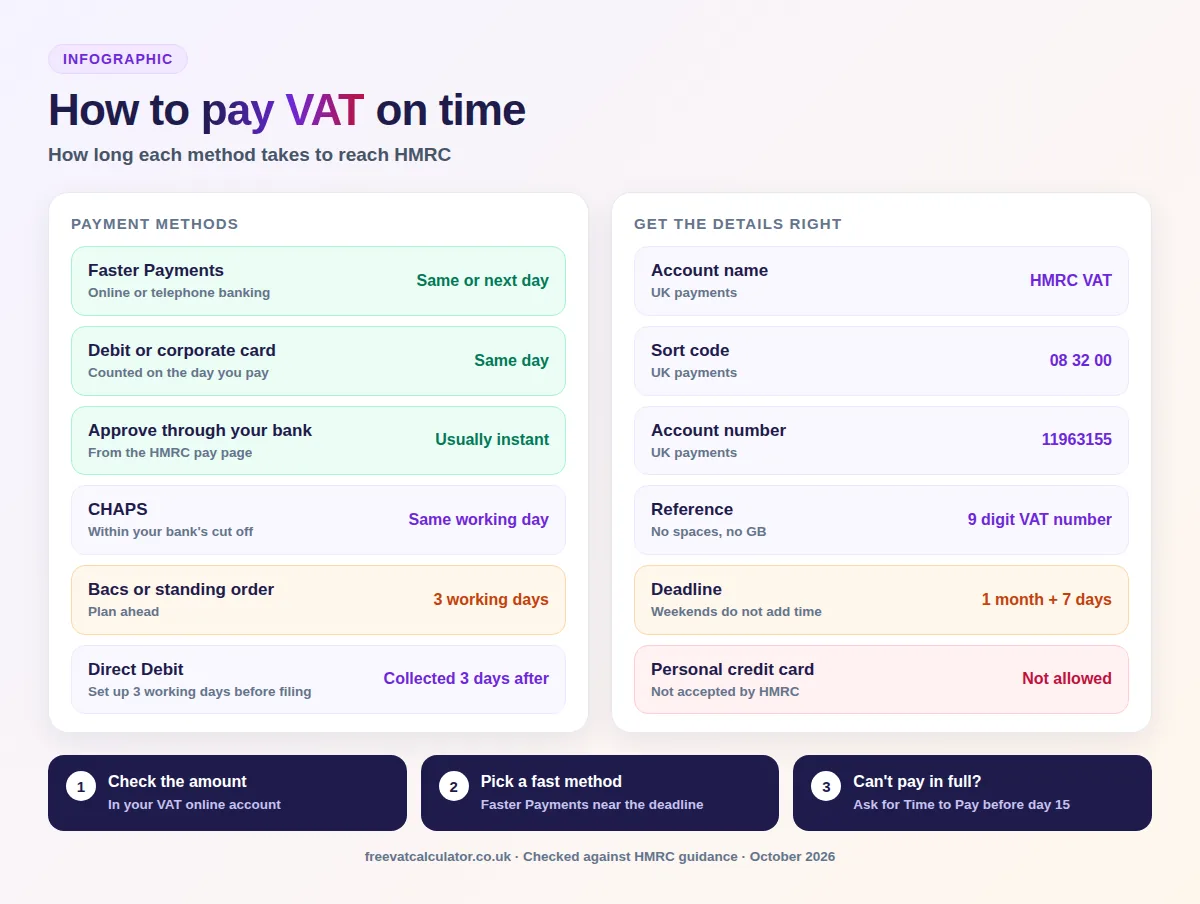
| Method | How long it takes | Best for |
|---|---|---|
| Direct Debit | Collected 3 working days after the deadline | Paying on time without thinking about it |
| Faster Payments (online or telephone banking) | Same or next day, including weekends | A last minute payment |
| CHAPS | Same working day, within your bank’s cut off | Large payments from a business account |
| Bacs | 3 working days | Planned payments from accounting software |
| Approve a payment through your bank account | Usually instant | Paying from the HMRC page in a few clicks |
| Debit or corporate credit card | Counted on the day you pay, even at weekends | Businesses without online banking |
| At your bank or building society | Counted on the day if paid Monday to Friday | Paying by cash or cheque with a paying in slip |
| Standing order | 3 working days | Annual Accounting Scheme and payments on account only |
Key facts
- Deadline
- 1 calendar month and 7 days after the VAT period ends
- Bank details
- HMRC VAT, sort code 08 32 00, account 11963155
- Reference
- Your 9 digit VAT number, no spaces
- Fastest methods
- Faster Payments, card or approve through your bank
- Late payment
- 3% at day 15, 3% more at day 30, then 10% a year
- Can’t pay
- Time to Pay online for debts up to £50,000
When is your VAT bill due?
For most businesses the payment deadline is the same as the return deadline: one calendar month and seven days after the end of the VAT period. A quarter ending on 30 September 2026 must be filed and paid by 7 November 2026, and the money has to be in HMRC’s account by then, not just leaving yours.
Those seven extra days only apply to electronic payments. Businesses on the Annual Accounting Scheme or making payments on account have their own dates, which are covered further down. Our guide to VAT return deadlines lists every quarter for 2026 to 2027.
What if the deadline falls on a weekend?
HMRC confirmed in May 2026 that VAT deadlines are fixed in law and do not move to the next working day. If the seventh falls on a Saturday or Sunday, pay by the last working day before it unless you use a method that works at weekends, such as Faster Payments or a card. The 7 November 2026 deadline is a Saturday, so a Bacs payment for that quarter needs to clear by Friday 6 November.
How to pay VAT online, step by step
Paying online takes a few minutes once you know the amount and the reference. You can start from your bank or from the GOV.UK pay your VAT bill page, and the usual process looks like this:
- Sign in to your VAT online account and check the amount due and the deadline for the period.
- Choose a payment method that will reach HMRC in time, using the table above.
- Use your nine digit VAT registration number, with no spaces, as the payment reference.
- Make the payment from your bank, by card, or through the HMRC pay online page.
- Keep the confirmation, and check a few days later that the payment shows in your VAT account.
Ways to pay your VAT bill
HMRC accepts several methods, and each has its own timing and limits. Here is what you need to know about each one before you choose.
Pay by Direct Debit
Direct Debit is the simplest way to pay VAT on time every quarter. You set it up in your VAT online account at least three working days before you submit your return, and HMRC collects the amount three working days after the payment deadline. If you file late, it takes the money three working days after you file.
A Direct Debit cannot be used for payments over £20 million, from overseas bank accounts, by businesses making payments on account, or by insolvency practitioners. It also cannot collect penalties, so those need a separate payment. If you have not used your Direct Debit for two years or more, check with your bank that it is still active.
Online or telephone banking
You can pay HMRC directly from your own bank by Faster Payments, CHAPS or Bacs. Faster Payments usually arrive the same or next day, including weekends and bank holidays, which makes them the best choice close to a deadline. CHAPS usually arrives the same working day if you send it before your bank’s cut off time, while Bacs takes three working days.
Approve a payment through your bank account
HMRC’s pay online page lets you sign in to your own bank and approve the payment there, with the amount and reference already filled in. The money usually reaches HMRC instantly, though it can take up to two hours to show in your bank account. It is a good option if you worry about typing the bank details or reference wrongly.
Pay VAT by debit or corporate credit card
You can pay online with a corporate credit card, a corporate debit card or a personal debit card. Personal credit cards are not accepted. Corporate cards carry a fee that HMRC will not refund, while personal debit cards are free, and a card payment counts as made on the day you pay, even at a weekend.
At your bank or building society
You can pay by cash or cheque at your bank using an HMRC paying in slip, and the payment counts on the day you make it if that is Monday to Friday. Slips are ordered by emailing HMRC’s electronic payment team, and they can take up to four weeks to arrive, so order them well before you need them. The current guidance no longer offers a way to send a cheque by post.
Standing order
A standing order is only allowed if you are on the Annual Accounting Scheme or make payments on account. You can set one up with form VAT 622 or through your own bank, and payments take three working days to arrive. Everyone else should use a Direct Debit or one of the methods above.
Paying from an overseas bank account
If your business banks outside the UK, you can pay HMRC by international transfer in sterling using the IBAN and BIC below. Allow extra time, because overseas payments pass through more than one bank. You cannot set up a VAT Direct Debit from an overseas account.
Can you pay VAT by phone?
You can pay through your bank’s telephone banking service using HMRC’s bank details, and the timing is the same as online banking. HMRC’s card payments are made online rather than through a separate phone line in its current guidance. If you have no internet access, paying at your bank is the other option.
HMRC bank details for VAT payments
Use these details exactly when you pay by bank transfer. A missing or wrong reference is the most common reason a payment goes astray.
| Detail | UK payments | Overseas payments |
|---|---|---|
| Account name | HMRC VAT | HMRC VAT |
| Sort code and account number | 08 32 00 and 11963155 | Not used |
| IBAN | Not needed | GB36 BARC 2005 1773 1523 91 |
| BIC | Not needed | BARCGB22 |
| Reference | Your 9 digit VAT number, no spaces | Your 9 digit VAT number, no spaces |
HMRC VAT payment details
Type your VAT number to get the exact reference, then copy each detail
Waiting
Enter your nine digit VAT number to build the payment reference.
Account name: HMRC VAT. The reference is your VAT number with no GB prefix and no spaces. Nothing you type here leaves your browser.
To pay a VAT penalty, use the 14 character reference that starts with X, shown on the penalty letter. If you used the wrong reference, call the VAT helpline on 0300 200 3700 so HMRC can move the money to the right account.
How to check your VAT payment reached HMRC
Your VAT online account shows the payments HMRC has received and anything still outstanding. HMRC does not publish how quickly a payment appears there, so the safest check is to confirm the money left your bank on the right day and keep that proof. If it still has not shown after a few working days, call the VAT helpline with your bank confirmation ready.
If a Direct Debit fails, HMRC treats the VAT as unpaid, so penalties and interest can apply. Pay straight away by another method, such as Faster Payments, to stop the cost building up.
Paying VAT on the Annual Accounting Scheme or payments on account
Annual Accounting businesses pay in advance through the year, either nine monthly payments of 10% or three quarterly payments of 25% of the previous year’s bill. The balancing payment is due with the return, two months after the end of the accounting year, and these payments must be made electronically.
Payments on account apply if you file quarterly and your VAT bill is over £2.3 million in any 12 months. You pay one twenty fourth of your annual liability at the end of the second and third months of each quarter, then a balancing payment with the return. These dates have no seven day extension, and Direct Debit cannot be used.
What happens if you pay VAT late?
For VAT periods starting on or after 1 January 2023, late payment penalties build in stages. The rates rose on 1 April 2025, and these are the ones in force now:
| How late | Penalty |
|---|---|
| Up to 15 days | No penalty, but interest runs from day one |
| 16 to 30 days | 3% of the VAT still unpaid at day 15 |
| 31 days or more | A further 3% of the VAT unpaid at day 30, plus a second penalty of 10% a year charged daily |
Late payment interest is charged on top at the Bank of England base rate plus 4%, which is 7.75% a year since 9 January 2026. The base rate is next reviewed on 5 November 2026, so the interest rate may change. Our VAT late payment calculator works out the exact cost for your bill.
- 3%First penalty, VAT unpaid at day 15
- +3%Second charge, VAT unpaid at day 30
- 7.75%Yearly interest since 9 January 2026
Can’t pay your VAT bill? How HMRC Time to Pay works
If you cannot pay in full, contact HMRC before the deadline, or as soon as you know. A Time to Pay arrangement lets you spread the bill over monthly instalments, and asking early keeps penalties down and gives you the most options.
Set up a VAT payment plan online
Many businesses can set up a plan online without speaking to anyone, for VAT debts of up to £50,000. You pay by Direct Debit from a UK bank account you are allowed to use, and HMRC expects you to use any savings first. The online service tells you whether you are eligible before you commit.
Call HMRC’s payment support line
If you owe more, or the online service turns you down, call HMRC’s payment problems line on 0300 200 3831, Monday to Friday, 8am to 6pm. Have your VAT number, bank details, and a clear idea of what you can afford each month ready. HMRC will ask about your income, spending and any money owed to you.
How Time to Pay affects penalties
Asking for Time to Pay stops late payment penalties building up from the date you make the request, as long as you then keep to the plan. Interest still runs on the unpaid VAT. If you break the arrangement, HMRC can recalculate the penalties as if the plan never existed.
| When you ask | Penalty you pay |
|---|---|
| By day 15 after the deadline | No penalty |
| Between day 16 and day 30 | The first 3% penalty only |
| After day 30 | Both 3% penalties, plus the 10% yearly penalty up to the day you ask |
Can you pay VAT in instalments?
Yes, through a Time to Pay arrangement, or by joining the Annual Accounting Scheme, which spreads the bill across the year. You cannot simply pay part of the bill and send the rest later without an agreement, because the unpaid part still counts as late.
Other ways to keep a VAT bill manageable
A few habits make the next bill easier to pay. These are the ones that help most:
- move the VAT part of every sale into a separate savings account
- join the cash accounting scheme, so you only pay VAT once customers have paid you
- check the Flat Rate Scheme if your costs are low
- chase late customer payments, and claim bad debt relief on invoices unpaid for six months
Getting a VAT repayment
If your return shows HMRC owes you money, the repayment usually arrives within 30 days of HMRC receiving the return. It goes to the bank account on your VAT registration, not the Direct Debit account, so add your bank details in the VAT online account or you will get a cheque. You can follow progress with HMRC’s repayment tracker, and HMRC pays repayment interest if it is late.
Will Direct Debit become compulsory?
Possibly. HMRC consulted from 23 June to 16 August 2026 on requiring most VAT and PAYE bills to be paid by Direct Debit, with proposed exceptions for digitally excluded businesses and payments over £20 million. Ideas included limiting the seven day extension to Direct Debit payers, but no start date has been set, and we will update this page when HMRC decides.
Common mistakes when paying VAT
Most VAT payment problems come from a handful of avoidable slips. Check you are not making any of these:
- paying on the deadline by Bacs, which takes three working days to arrive
- adding spaces, letters or the GB prefix to the nine digit reference
- setting up a Direct Debit less than three working days before filing
- assuming a weekend deadline moves to Monday
- paying with a personal credit card, which HMRC rejects
- paying part of the bill without agreeing Time to Pay first
Want to check the VAT on your bill?
Add or remove VAT at 20% or 5% in seconds with the free VAT calculator.
Pay VAT FAQs
These are the questions businesses ask most when it is time to pay VAT. The sections above cover each method in more detail.
How long do I have to pay my VAT bill?
Usually one calendar month and seven days after the end of your VAT period. Annual Accounting and payments on account businesses have different dates.
Can I pay my VAT bill with a credit card?
Only with a corporate credit card, which carries a non refundable fee. HMRC does not accept personal credit cards for VAT.
What reference do I use to pay VAT?
Your nine digit VAT registration number, with no spaces and no GB prefix. Penalties use the 14 character reference starting with X.
Can I pay VAT at the weekend?
Yes, by Faster Payments or card, and both count on the day you pay. Bacs and CHAPS only move on working days, so use them by the Friday before a weekend deadline.
Can I pay my VAT bill in monthly instalments?
Yes, if HMRC agrees a Time to Pay arrangement, which many businesses can set up online for debts up to £50,000. The Annual Accounting Scheme also spreads payments through the year.
Can I change my VAT payment method?
Yes, at any time. You can set up or cancel a Direct Debit in your VAT online account, and you can choose any other method each quarter.
If your question is not answered here, the VAT helpline on 0300 200 3700 can help with payments, and the payment problems line on 0300 200 3831 deals with Time to Pay. Both lines are open Monday to Friday, 8am to 6pm.
You now know every way to pay VAT, how long each method takes, the bank details and reference to use, and what to do if you cannot pay in full. All the information you need to settle this quarter’s bill on time is above.
Sources: HMRC, Pay your VAT bill; HMRC, Pay by Direct Debit; HMRC, Pay using another payment method; HMRC, late payment penalties; HMRC interest rates; HMRC, pay in instalments; HMRC, VAT repayments; HMRC Direct Debit consultation. This page is general information, not tax advice.