VAT registration guide
VAT Certificate: How to View, Download or Get a Copy of Your VAT Registration Certificate
How to find your certificate online
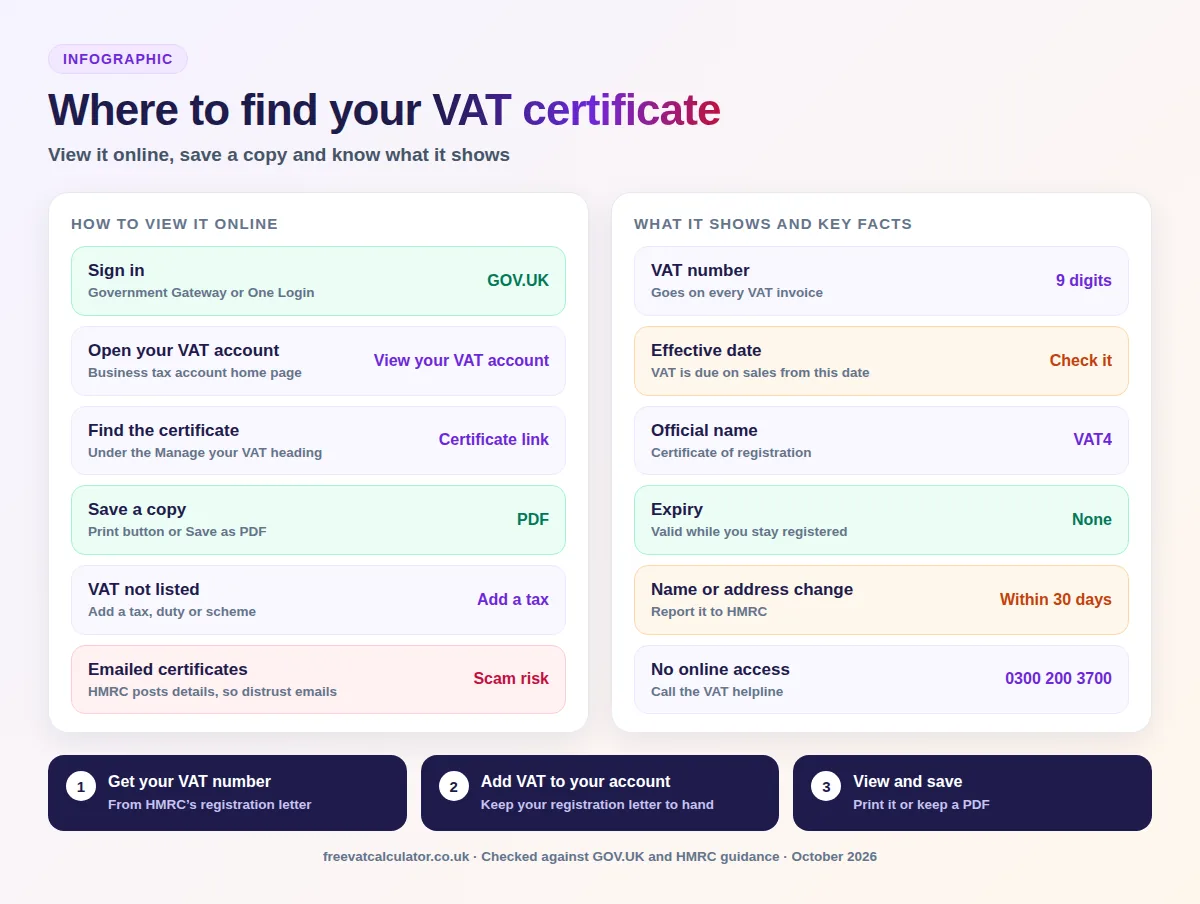
- Sign inGovernment Gateway or One Login
- Business tax accountFind the VAT section
- View your VAT accountOpen the VAT service
- Manage your VATChoose the certificate link
- Print or saveKeep a PDF copy
A supplier wants proof that you are VAT registered, your bank is asking for paperwork, or a marketplace has paused your account until you upload a document you have never seen. You search your inbox and find nothing, because HMRC sends your registration details by post and keeps the certificate in your online account.
The document sits in your HMRC online account, and you can open, print or save it in a few minutes. This guide shows each screen, explains what to do when nothing shows and sorts out the documents people mix up with it, so you know exactly where your VAT certificate is.
How to view your VAT certificate online in 4 steps
You can view the certificate yourself once VAT has been added to your HMRC online account. The screenshots below follow the business tax account that most registered businesses already use.
Step 1: Sign in to HMRC online services
Sign in on GOV.UK with the Government Gateway user ID and password you registered with, then enter the access code HMRC sends you by text, voice call or authenticator app. GOV.UK now lists GOV.UK One Login as a second way to sign in, and first time users may be guided to create those details instead. If you already have sign in details, GOV.UK says to keep using them.

Step 2: Open your VAT account
Your business tax account lists each tax you have added. In the VAT section, select the link that opens your VAT account, as shown in the screenshot below.

Step 3: Select View your VAT certificate
Scroll down to the Manage your VAT heading and choose “View your VAT certificate”. HMRC’s VAT Registration Manual confirms that certificates are not routinely issued and are held in your VAT online account, so this link is the place to look.

Step 4: Check, print or save the certificate
The certificate opens on screen, as in the screenshot below. Check each detail against your records, then use the Print button or your browser’s print option to print it or save it as a PDF.


Screenshots of HMRC’s online services. All logos belong to their respective owners.
Key facts
- Where it is
- Your HMRC VAT online account, under Manage your VAT
- Official name
- Certificate of registration, form VAT4
- What it shows
- Usually your VAT number, effective date, business details and return periods
- How it reaches you
- Registration details by post; the certificate stays in your VAT online account
- Changes
- Tell HMRC within 30 days of a new name or address
- Expiry
- None while you stay VAT registered
Quick checker: where is my certificate?
If the steps above did not work, answer four quick questions. The checker shows where your certificate should be, what you need and who can help.
Where is my VAT certificate?
Four questions, then where to look and what to do
Your certificate is in your VAT account
Sign in, choose View your VAT account, then View your VAT certificate under the Manage your VAT heading. Use the Print button or your browser’s print option to print it or save it as a PDF.
Based on GOV.UK and HMRC guidance, October 2026. HMRC sends registration details by post and keeps the certificate in your online account, so distrust any email offering one.
What is a VAT certificate?
A VAT certificate is HMRC’s confirmation that a business is registered for VAT. Its official name is the certificate of registration, form VAT4, and HMRC’s manual says it is not routinely posted but is held in your VAT online account. People also call it a VAT registration certificate, a VAT cert or a VAT tax certificate.
The document itself carries little legal weight. HMRC’s manual says it only tells you that HMRC has registered you, a view a VAT tribunal confirmed in the Maidstone Sailing Club case in 1978, so what really counts is the registration on HMRC’s records.
What your VAT registration certificate shows
The layout has changed over the years, so treat the table below as the details a certificate usually shows rather than an official list. GOV.UK confirms the core facts every new registration comes with: a 9 digit VAT number, your effective date of registration and information about when your first return and payment are due.
| Detail | What it means | Why it matters |
|---|---|---|
| VAT registration number | 9 digits, often written with GB in front | It must appear on every VAT invoice |
| Effective date of registration | The day your registration starts | VAT is due on taxable sales from this date |
| Business and trading name | The names HMRC holds for you | They should match your invoices |
| Principal place of business | Your main business address | Tell HMRC within 30 days if it changes |
| VAT return periods | The months your VAT quarters end | They set your filing deadlines |
| First return due | Your first VAT period and its deadline | The first period can be longer or shorter than a quarter |
Why you might need the certificate
You can trade without the certificate in your hand, but plenty of people will ask for it once you are registered. These are the usual reasons.
- adding your VAT number to every invoice, as GOV.UK requires
- opening trade accounts with suppliers who want proof of registration
- business bank accounts, loans and finance applications
- marketplaces such as Amazon that verify sellers’ VAT details
- setting up accounting software with the right dates and periods
How long it takes to get your certificate
GOV.UK gives no fixed number of days and points you to HMRC’s “Check when you can expect a reply” tool, which it updates weekly. VAT Notice 700/1 says to contact HMRC if you have not heard back after 40 working days, and warns that an application takes longer if HMRC needs more information from you.
If you registered online
GOV.UK says your VAT number and registration details arrive by post, even when you apply online. Once they arrive, sign in and check whether VAT is listed in your account, and add it if it is not, because HMRC’s manual says the certificate is held in your VAT online account.
If you registered by post
GOV.UK only requires the paper VAT1 form in set cases, such as joining the Agricultural Flat Rate Scheme. Wait for HMRC’s letter with your VAT number, then sign up for a VAT online account straight away so you always have a copy to hand.
If an accountant registered you
If your accountant applied for you, ask them for your VAT number and effective date once HMRC confirms the registration. GOV.UK confirms you can still set up your own VAT online account, even if your agent files your returns.
Why your certificate is not showing online
A missing certificate is almost always down to timing or the wrong account. If you cannot get VAT details or the certificate link to show, check these causes before you call HMRC.
- your registration has not been approved yet
- VAT is not added to the account you signed in to
- you used a personal tax or Self Assessment account
- your accountant registered you and you have no access
- a technical fault, which HMRC’s VAT online services helpdesk on 0300 200 3701 can help with
How to add VAT to your business tax account
Sign in, select “Add a tax, duty or scheme” and choose “VAT and VAT Services”, not Self Assessment, as GOV.UK sets out. HMRC then checks the details you enter against its own records, so keep your VAT number and registration letter to hand before you start.
How to download your certificate as a PDF
The quickest way to get a PDF is through the print screen. It takes under a minute on any computer.
- open the certificate as shown in step 3 above
- select Print, or press Ctrl and P on Windows or Cmd and P on a Mac
- choose Save as PDF as the printer
- name the file “VAT certificate” with your business name and the date
How to get a copy of your certificate
Lost the paper version or deleted the PDF? You do not need a replacement, because the online version stays in your account while you are registered.
Request a copy from HMRC by phone
If you cannot get online, call the VAT helpline on 0300 200 3700, or +44 2920 501 261 from abroad, Monday to Friday from 8am to 6pm. GOV.UK says to have your VAT number and postcode ready, and because HMRC’s manual says certificates are not routinely issued, ask the adviser how they can confirm your registration details.
GOV.UK says HMRC sends your registration details by post, and HMRC’s manual says the certificate itself is held in your VAT online account. Treat any email claiming to attach your certificate with suspicion, and sign in through GOV.UK to see the real one.
Recover lost sign in details
Use the recovery links on the HMRC sign in page rather than creating a new account. A new account will not show your VAT until you add it again.
Can your accountant get it for you?
Yes, once you authorise them for VAT, as GOV.UK lists printing VAT certificates among the things an authorised agent can do. Since 16 February 2024, accountants can no longer use HMRC’s Online Agent Authorisation service for VAT, so the usual route is a link sent from their agent services account. GOV.UK says that link expires after 21 days, so accept it promptly. Keep your own access too, so you can print the certificate whenever someone asks.
Charging VAT before your VAT number arrives
Before your effective date of registration, you must not charge or show VAT at all, because GOV.UK says you must register before you start charging it. From that date you owe VAT on taxable sales, even though your number may take weeks to arrive. In that gap you cannot show VAT on invoices, but you can raise your prices to cover the VAT you will owe and tell customers why.
Selling to VAT registered businesses
Say you do £1,000 of work for a business customer while you wait. You can invoice £1,200 with no VAT shown and a note that a VAT invoice will follow, then reissue it as £1,000 plus £200 VAT once your number arrives, so your customer can reclaim the £200. If you invoice only £1,000, section 19 of the VAT Act 1994 treats that £1,000 as including VAT, so £166.67 of it goes to HMRC.
Selling to consumers
Consumers cannot reclaim VAT, so the simplest approach is to raise standard rated prices by 20% from your effective date and explain why. Note on receipts that VAT registration is pending, and reissue VAT invoices to anyone who asks once your number arrives.
| Customer | While you wait | Once your number arrives |
|---|---|---|
| Business, price raised | Invoice £1,200 with no VAT shown | Reissue as £1,000 plus £200 VAT |
| Business, price not raised | Invoice £1,000 with no VAT shown | £166.67 of it is VAT you owe |
| Business, invoice delayed | Agree to invoice later, but count the sale in its own VAT period | Issue one invoice for £1,000 plus £200 VAT |
| Consumer | Raise standard rated prices by 20% | Reissue VAT invoices on request |
What to do when your certificate arrives
Treat the day it arrives as a checklist moment. A wrong date or return period is much easier to fix before your first return is due.
- check the business names and address
- check the effective date is the one you expected
- note your return periods and first deadline
- add your VAT number to invoices and your website
- save a PDF copy with your VAT records
Making Tax Digital starts straight away
GOV.UK says all VAT registered businesses should now be signed up for Making Tax Digital for VAT, so you no longer need to sign up yourself. Unless HMRC agrees you are exempt, VAT Notice 700/22 says you must keep digital records and file your returns through compatible software, and our guide to Making Tax Digital explains what that means.
Does the certificate expire?
No. It stays valid for as long as you are registered, but the details on it can go out of date.
Updating your details after a change
GOV.UK says you must tell HMRC within 30 days if your business name, trading name or main address changes, or if you change the accountant who deals with your VAT. Most changes can be made in your VAT online account, and new repayment bank details need 14 days’ notice. Once HMRC has processed a change, save a fresh copy of the certificate.
What happens when you deregister
Once your registration is cancelled, the certificate no longer proves anything and you must stop charging VAT from the cancellation date. HMRC usually confirms within 40 working days and cancels your EORI number at the same time, and our guide on how to deregister from VAT covers the final return and the £88,000 threshold.
Checking a supplier’s VAT number instead
You cannot view another business’s certificate, and you do not need to. HMRC’s free Check a UK VAT number service shows the name and address any UK number belongs to, and if you add your own VAT number it also gives you proof of when you checked. Our UK VAT number checker guide explains how to read the result.
Other certificates people confuse it with
Several HMRC documents have “certificate” in their name, and people often search for the wrong one. These three cause the most confusion.
Certificate of status (VAT66)
This proves to another country’s tax authority that you trade in the UK, usually for a VAT refund claim abroad. Email vat66@hmrc.gov.uk at least a month before you need it. HMRC aims to email the certificate within 15 working days, and it is usually valid for 12 months.
C79 import VAT certificate
A C79 shows import VAT paid through a duty deferment account and appears monthly, usually by the 10th working day. If you use postponed VAT accounting, you get a monthly statement instead, as our guide to postponed VAT accounting explains, and both stay available for 6 months.
VAT exemption certificate
This is really a written eligibility declaration a customer gives a supplier to buy qualifying goods without VAT. Disabled people use one for items such as stair lifts, as our guide to VAT relief for disabled people explains, and charities give similar declarations for some reliefs.
No certificate yet? How to apply for VAT registration
You cannot apply for the certificate on its own, because it follows once HMRC registers you. You must register if your taxable turnover went over £90,000 in the last 12 months or will in the next 30 days alone, and you can register voluntarily below that. Our guide on how to register for VAT walks through the application, and the steps above then show you how to get your VAT certificate.
How to keep your certificate safe
The certificate shows your VAT number, address and registration date, which fraudsters can misuse. These habits keep it useful without putting it at risk.
- store the PDF with your VAT records for 6 years
- send it only to people who need it, such as your bank
- sign in through GOV.UK, never through an email link
Registered and ready to invoice?
Our free VAT calculator adds or removes VAT at 20% or 5%. It shows the working, so your first VAT invoices add up.
VAT certificate FAQs
These are the questions people ask most once they start looking for their certificate. The sections above go into more detail on each one.
Is a VAT certificate the same as a VAT number?
No. The number is the 9 digit reference HMRC gives you, and the certificate is the document that shows it with your effective date and other details.
How do I get my VAT certificate if I registered by post?
Wait for HMRC’s letter with your VAT number, then set up a VAT online account and add VAT to it. The certificate then appears in the Manage your VAT section of that account.
Where can I find my certificate if my accountant registered me?
Ask your accountant for your VAT number and effective date, then add VAT to your own business tax account. You can also ask them to send you a PDF copy.
Can I request a copy by phone?
You can call the VAT helpline on 0300 200 3700 if you cannot get online. HMRC’s manual says certificates are not routinely issued and are held in your VAT online account, so ask the adviser how they can confirm your registration details.
You now know where your VAT certificate lives, how to view, print or save it, and what to do when it is missing or out of date. If HMRC’s screens have changed since we checked, tell us through our contact page, and our free VAT calculator works out the VAT on any price once you start invoicing.
Sources: GOV.UK, How to register for VAT; GOV.UK, When to register for VAT; GOV.UK, Changing your VAT details; GOV.UK, Cancel your VAT registration; HMRC manual VATREG03650; HMRC, VAT general enquiries; HMRC, certificate of status (VAT66); HMRC, C79 guidance; HMRC, postponed import VAT statements; HMRC, Check a UK VAT number; GOV.UK, VAT relief for disabled people; VAT Act 1994, section 19; GOV.UK, Sign in to HMRC online services; GOV.UK, How to use the digital handshake; GOV.UK, Manage your client’s details for VAT; GOV.UK, Charge, reclaim and record VAT; HMRC, VAT Notice 700/1; HMRC, VAT Notice 700/22; GOV.UK, Selling or moving goods between Northern Ireland and the EU; HMRC, VAT online services helpdesk. This page is general information, not tax advice.