Income Tax refund guide
HMRC Tax Refund: How to Check, Claim Your P800 and Get Paid Safely
How to get an HMRC tax refund
- CheckApp or tax account
- Find your routeP800, P50, P85 or R40
- Claim on GOV.UKNever through a link
- Wait5 days to 6 weeks
- Stay safeReport fake messages
A letter from HMRC says you paid too much tax, or a text says you are owed money and asks you to tap a link. You want the cash quickly, but you also want to be sure the message is real and that you are using the right form.
This guide starts with a route finder that matches your situation to the right GOV.UK claim, how long it takes and the last date you can claim. Below it you will find how the P800 works, the other ways to reclaim overpaid tax and how to spot a scam, so your HMRC tax refund reaches you and nobody else.
Find your HMRC tax refund route
Pick what happened, the tax year you overpaid in and how you want to be paid. The finder shows the claim route, GOV.UK’s timing, your deadline and a link to the official page, and it never asks for personal details.
HMRC tax refund route finder
Pick what happened to see the right claim, how long it takes and your deadline
Claim your P800 refund
Checking your route.
Routes, timings and time limits from GOV.UK, checked 11 November 2026. The finder is general information, not tax advice, and it never asks for personal details.
Key facts
- P800 letters sent
- June to March after the tax year
- P800 claimed online
- Paid within 5 working days
- Cheque you request
- Within 6 weeks
- Earliest year still open
- 2022 to 2023, until 5 April 2027
- Income Tax helpline
- 0300 200 3300
- Scam refund texts
- Forward to 60599
What is an HMRC tax refund?
An HMRC tax refund is money paid back when more Income Tax was taken from your pay, pension or savings than you owed. GOV.UK uses refund, rebate and repayment for the same thing, so a tax rebate is simply another name for it. Most overpayments happen through PAYE, because your employer deducts tax using a tax code that is only as accurate as the details HMRC holds.
Does HMRC refund overpaid tax automatically?
Partly. If you are employed or get a pension, HMRC checks your tax after the year ends on 5 April and sends a P800 tax calculation or a Simple Assessment letter when the figures do not match, while Self Assessment customers have their bill adjusted instead.
HMRC cannot see costs it does not know about, such as a uniform you clean yourself. GOV.UK’s refund checker covers nine kinds of overpayment, from job expenses and redundancy pay to savings interest and income earned before leaving the UK, with a separate checker for pensions.
Why you might be owed tax back
GOV.UK gives four common reasons for a P800, and claims for expenses, pensions and savings add a few more. Check whether any of these happened to you in the last four tax years.
- You were on the wrong tax code because HMRC had the wrong income details
- You finished one job, started another and were paid by both in the same month
- You started receiving a pension at work
- You received Employment and Support Allowance or Jobseeker’s Allowance
- You were taxed on an emergency code after starting a new job
- You stopped work part way through the tax year
- You paid for uniform, tools or professional fees yourself
- You took a flexible payment or a small lump sum from a pension
- Tax was taken from savings or PPI interest while your income was low
How to check if you are due a tax refund
The quickest way to check a tax refund with HMRC is to sign in rather than wait for the post. Your personal tax account shows your tax code, an estimate for this year and the Income Tax you paid in each of the previous five years.
- Look out for a P800 or Simple Assessment letter after the tax year ends.
- Sign in to the HMRC app or your personal tax account.
- Check your tax code and the employer and pension details HMRC holds.
- Compare the tax shown for each year with your P60s and final payslips.
- If a year looks wrong and no P800 came, send HMRC an update for that year.
Using the HMRC app and your personal tax account
The HMRC app runs on iOS and Android and lets you check your tax code, find your UTR and claim a refund if you have paid too much. Your personal tax account does the same in a browser and tracks forms you have sent online, which is the simplest way to follow the status of a claim.
The P800 tax calculation explained
A P800 is HMRC’s tax calculation letter. It goes to people who are employed or get a pension when HMRC finds that too much or too little tax was paid by 5 April, and it tells you how to get the money back or how the shortfall will be collected.
When HMRC sends P800 letters
P800 letters go out between June and March after the tax year ends. For the 2025 to 2026 year, which ended on 5 April 2026, GOV.UK says you should get a P800 by 30 November 2026 if HMRC works out that you overpaid.
HMRC may also text or email you about a P800 refund, but only after it has written to you and had no reply. Those reminders contain no link and never ask for personal or financial details.
If your P800 says you owe tax
HMRC usually collects an underpayment through your tax code, in equal amounts over 12 months from the next tax year, if you pay tax through an employer or pension, earn enough above your Personal Allowance and owe less than £3,000. Otherwise it writes to explain how to pay, which may mean a Simple Assessment bill.
If the figures look wrong
Check the income and tax figures against your P60 and payslips before you accept a P800 refund or bill. If something is wrong, contact HMRC and say which amounts are incorrect and what they should be; if HMRC agrees you get a new calculation, and if not it explains why.
How to claim your P800 refund
Your P800 tells you which of two routes applies: claim online, or wait for a cheque. The genuine P800 refund page sits on GOV.UK under tax overpayments and underpayments, and its Claim now button opens HMRC’s service on tax.service.gov.uk.
| Route | What you need | When the money arrives |
|---|---|---|
| Online bank transfer | P800 reference and National Insurance number | Within 5 working days |
| Cheque requested online | P800 reference and National Insurance number | Within 6 weeks |
| HMRC app or personal tax account | Sign in details and a UK bank account | Within 5 working days, as an online claim |
| Letter says a cheque is coming | Nothing, it is posted automatically | Within 14 days of the date on the letter |
If you are owed for more than one year and your letter promises a cheque, you get a single cheque for the whole amount. You can also claim by contacting HMRC, and an automatic cheque needs no action from you at all.
Never claim through a link in a text or email. Type GOV.UK into your browser or open the HMRC app, then follow the P800 refund route from there.
How to claim a tax refund without a P800
Many overpayments never produce a P800, because HMRC only works from the information it is sent. The right claim depends on what happened, and the sections below cover each route the finder uses.
Still in the same job: the tax code fix
If you are overpaying now, the cause is usually out of date details, such as a new job, a second job or company benefits HMRC has not recorded. Check and update your tax code in the HMRC app or personal tax account, and once HMRC sends your employer the corrected code, the refund comes back in your next pay.
Emergency tax after starting a new job
An emergency tax code ends in W1, M1 or X, or shows NONCUM on your payslip, and it taxes each payment as if you earned that amount all year. Give your new employer your P45, because HMRC usually updates the code once it has your details, which can take up to 35 days, and any overpaid emergency tax can then be refunded.
Stopped work: form P50
If you have stopped working and do not expect to start a new job within 4 weeks, you can claim this tax year’s overpayment on form P50, ideally online. You need your final pay, parts 2 and 3 of your P45 and your National Insurance number, and a reply can take 14 days.
P50 is not for you if you claim taxable state benefits, get a works pension or are still registered with an employment agency. If your last pay was before 5 April, the claim belongs to the previous tax year.
Uniform and work expenses
If you pay for things your job needs and your employer does not repay you, you can claim tax relief for this tax year and the 4 previous ones. That covers cleaning, repairing or replacing a uniform or specialist clothing, small tools, professional fees and work travel, but not the first purchase of work clothes or protective equipment.
Relief comes at your tax rate, so GOV.UK’s example of £60 spent by a 20% taxpayer is worth £12, and working from home relief is not available for 2026 to 2027. Claims of up to £2,500 a year go through the online job expenses service, or by post on form P87, while bigger claims and Self Assessment filers use a tax return.
Pension lump sums and flexible payments
If too much tax came off a pension payment, GOV.UK has a separate pension refund checker covering full withdrawals after stopping work, small lump sums, flexible payments and annuity income. The postal forms are P55, P53Z, P53 and P50Z, the wrong one can delay the money, and HMRC pays by Faster Payments into your account or a nominee’s.
Leaving the UK: form P85
If you are leaving to live abroad, or to work abroad full time for at least a whole tax year, tell HMRC on form P85 and attach parts 2 and 3 of your P45. HMRC then works out any refund for the year you leave, and Self Assessment filers use the SA109 residence pages instead.
HMRC only sends cheques to UK addresses, either to you or to a nominee, so sort that out before you go. National Insurance paid in the UK cannot be claimed back if you leave for good.
Savings and PPI interest: form R40
If tax was taken from savings interest or a PPI payout and your total income is under £17,570, claim it back on form R40. GOV.UK says the money normally takes 6 weeks to arrive.
Redundancy pay and Marriage Allowance
If a redundancy payment led to too much tax, GOV.UK tells you to call HMRC, which may refund you before the tax year ends. Marriage Allowance is not a refund route as such, but transferring £1,260 of allowance cuts your partner’s tax by up to £252 a year, and claims can be backdated.
Refunds through Self Assessment
If you file a tax return, any refund comes through Self Assessment rather than a P800. When you ask for a repayment on the return, HMRC usually pays it within 2 weeks of an online filing, or of the date on your SA302 calculation for a paper return.
If you did not ask, choose Request a Repayment in your Self Assessment account, or Claim a tax refund in a personal or business tax account. HMRC may not refund credit if tax is due in the next 45 days, such as a payment on account, and then takes the money off that bill instead.
Refunds go only to UK bank accounts, and if you paid by card HMRC tries that card first. Security checks can add up to 12 more weeks, so contact HMRC only after 14 weeks in total, and never request the same refund twice.
HMRC’s repayment interest rate is 2.75% until 23 November 2026 and 3% from 24 November 2026, while late payment interest is 7.75%, rising to 8% on the same date. Our Self Assessment deadline guide covers the January dates that decide whether you owe or are owed.
Simple Assessment: a bill, not a refund
A Simple Assessment letter is how HMRC collects tax it cannot take through your tax code, such as tax on the State Pension or an underpayment over £3,000. GOV.UK lists only reasons to owe tax for this letter, so treat any message offering a Simple Assessment refund with care.
If any figure is wrong, contact HMRC within 60 days. Letters dated before 31 October 2026 for 2025 to 2026 must be paid by 31 January 2027, and later letters within 3 months of their date.
How long does an HMRC tax refund take?
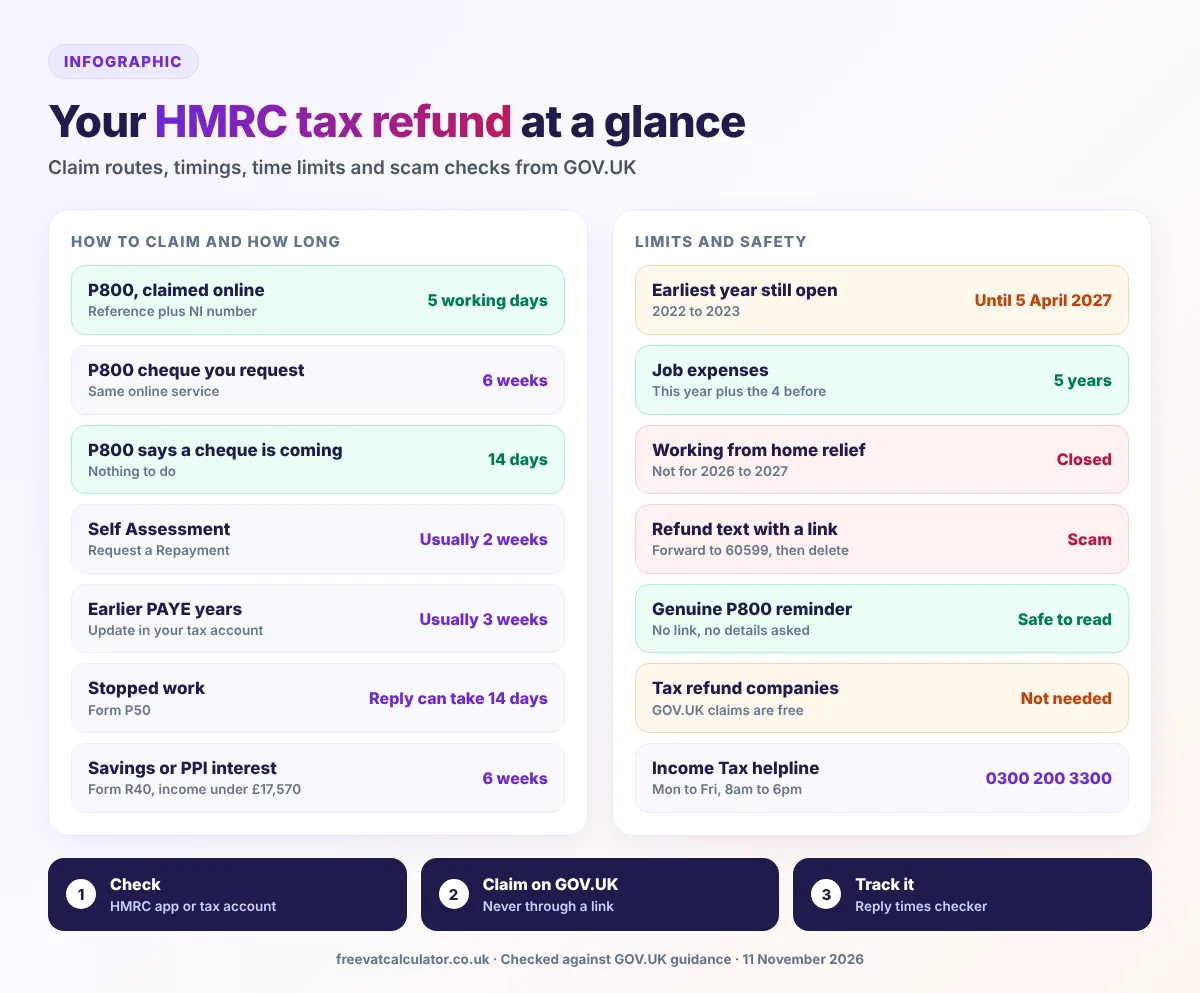
It depends on the route, and the figures below are GOV.UK’s own. Some websites still quote 21 days or 45 days for a P800 refund, but GOV.UK now says 5 working days online and 6 weeks for a cheque you request.
- 5working days for a P800 claimed online
- 6weeks for a P800 cheque you request or an R40 claim
- 14weeks before you chase a Self Assessment refund
| Route | GOV.UK timing |
|---|---|
| P800 claimed online | Within 5 working days |
| P800 cheque you request | Within 6 weeks |
| P800 automatic cheque | Within 14 days of the letter date |
| Earlier PAYE years through your tax account | Usually within 3 weeks |
| Stopped work, form P50 | A reply can take 14 days |
| Self Assessment | Usually 2 weeks, plus up to 12 weeks for security checks |
| Savings or PPI interest, form R40 | Normally 6 weeks |
| Current job tax code fix | Your next pay after the new code |
If your refund is late or shows as pending
A Self Assessment refund showing as pending has been created but still needs approval and payment. For anything else, use HMRC’s reply times checker, which is updated weekly, before you ring.
Claiming for previous years: how far back can you go?
You can claim for the current tax year and the 4 before it, and GOV.UK’s checker says tax overpaid before April 2022 cannot be reclaimed. Each year drops out after 5 April, so the 2022 to 2023 year must be claimed by 5 April 2027.
| Tax year | Year ended | Last day to claim |
|---|---|---|
| 2022 to 2023 | 5 April 2023 | 5 April 2027 |
| 2023 to 2024 | 5 April 2024 | 5 April 2028 |
| 2024 to 2025 | 5 April 2025 | 5 April 2029 |
| 2025 to 2026 | 5 April 2026 | 5 April 2030 |
| 2026 to 2027 | 5 April 2027 | 5 April 2031 |
For PAYE years from 2022 to 2025, GOV.UK asks you to check each year in your personal tax account and send an update for every year you overpaid. If HMRC agrees, the refund usually arrives within 3 weeks.
HMRC tax refund scams: how HMRC really contacts you
Fake refund messages work because they offer money you half expect. HMRC’s own checklist says contact could be a scam if it does any of the following.
- Rushes you or threatens you
- Arrives out of the blue
- Asks for bank or personal details
- Tells you to transfer money
- Offers a refund, tax rebate or grant
- Asks for payment in gift vouchers
What genuine HMRC refund messages look like
HMRC may text or email a P800 reminder after an unanswered letter, and text to confirm a Self Assessment refund is being processed, but neither contains a link or asks for personal or financial details. Genuine emails about a rebate only come from an address ending in hmrc.gov.uk, and HMRC never offers a rebate on social media or WhatsApp.
How to report a fake refund message
- Texts offering an HMRC tax refund: forward to 60599 (network charges apply), then delete
- Emails: forward to phishing@hmrc.gov.uk, then delete
- Social media accounts: email branddefence@hmrc.gov.uk
- Calls: use HMRC’s online form for suspicious phone calls
- Money lost: Report Fraud online, or call Police Scotland on 101 if you live in Scotland
If you have already shared personal details, report it to HMRC’s security team and call your bank straight away. Use HMRC’s scam checklist whenever a message feels off.
Do you need a tax refund company?
No. Every route on this page is free on GOV.UK, while a repayment agent charges a fee for making the same claim.
Since 15 March 2023 you can no longer legally assign an Income Tax repayment to an agent, so the money stays yours. If you want it paid to an agent, you nominate them instead, and you can cancel that nomination at any time.
HMRC tax refund contact number
For PAYE refunds, P800 questions and tax on savings, call the Income Tax helpline on 0300 200 3300, or +44 135 535 9022 from abroad. Lines open Monday to Friday, 8am to 6pm, and you need your National Insurance number.
Relay UK users dial 18001 then 0300 200 3300. Our guide to every HMRC contact number covers the other lines and the quieter times to call.
Refunds for the self employed and VAT registered businesses
Self employed people get overpaid Income Tax back through Self Assessment, often after a payment on account turns out too high, and our self employed tax calculator helps you see that coming. VAT is separate: a VAT registered business reclaims VAT on costs through its VAT Return, and our guide on how to do a VAT return shows the boxes involved.
Self employed and filing a return?
Our self employed tax calculator estimates your Income Tax and National Insurance for 2026 to 2027, so you can spot an overpayment early.
HMRC tax refund FAQs
These are the questions people ask most about getting money back from HMRC. Each answer follows GOV.UK guidance as it stood on 11 November 2026.
Is an HMRC tax refund text real?
It can be. HMRC may text a P800 reminder after a letter you did not answer, but that text has no link and never asks for details, so forward any refund text with a link to 60599 and delete it.
How do I check my tax refund status?
Sign in to your personal tax account, which shows your tax for recent years and tracks forms you have sent online, or use the HMRC app. A Self Assessment refund can show as pending while HMRC approves it.
How much tax back could I get?
It depends on what you overpaid, and a P800 shows the exact figure. For job expenses, the refund is what you spent multiplied by your tax rate, and it can never be more than the tax you paid that year.
Can I claim a tax refund if I am unemployed?
Yes. If you have been unemployed for 4 weeks or more and are not claiming taxable state benefits, you can claim on form P50, and if you start a new job within 4 weeks your new employer repays you through your pay.
Can I get a tax refund after leaving the UK?
Yes. Tell HMRC on form P85 when you leave and it works out any refund for that tax year, but it only posts cheques within the UK, so give a UK account or nominate someone.
You now know how to check whether HMRC owes you money, which claim fits your situation, how long it takes and how to keep scammers away from it. Use the route finder at the top whenever your situation changes, and always start your claim on GOV.UK or in the HMRC app.
Sources: GOV.UK, Tax overpayments and underpayments; GOV.UK, Check how to claim a tax refund; GOV.UK, Check how to claim a tax refund on your pension; GOV.UK, Claim a tax refund on your pension by post; GOV.UK, Claim back Income Tax when you’ve stopped working (P50); GOV.UK, Claim tax relief for your job expenses; GOV.UK, Emergency tax codes; GOV.UK, Tax if you leave the UK to live abroad; GOV.UK, Self Assessment: claiming a tax refund; GOV.UK, Pay your Simple Assessment tax bill; GOV.UK, Personal tax account; GOV.UK, Download the HMRC app; HMRC, Identify tax scams; HMRC, Report suspicious emails, texts and calls; HMRC, Genuine text messages; HMRC, Genuine emails; GOV.UK, Income Tax enquiries; HMRC interest rates; GOV.UK, Marriage Allowance; HMRC, Assignments of Income Tax repayments. This page is general information, not tax advice.