Free VAT tool
Remove VAT Calculator: Take VAT Off Any Price and See the Working
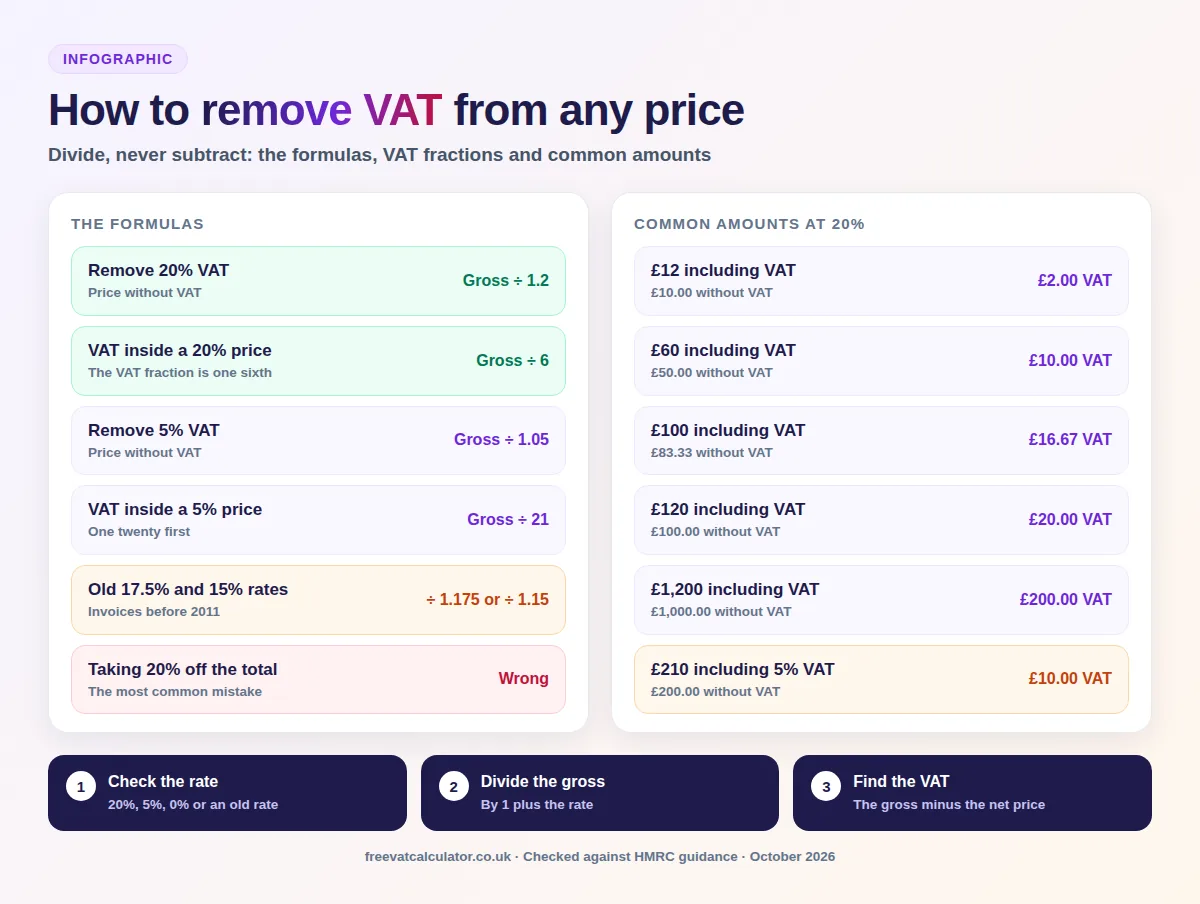
How to remove VAT from any price
- Start with the grossThe price including VAT
- Check the rate20%, 5%, 0% or an old rate
- DivideBy 1.2 at 20%, 1.05 at 5%
- Find the VATGross minus the net price
- Check itVAT is one sixth at 20%
A receipt says £84, a supplier quote says £1,440 including VAT, and your bookkeeping software wants the figure before VAT. Knocking 20% off feels right, but it gives the wrong answer, and the mistake only shows when your VAT return will not match your invoices.
The calculator below takes the VAT out of one price or a whole list, shows the working and copies the result. Under it are the formulas, ready made tables, spreadsheet formulas and the rules on reclaiming VAT, so you can remove VAT from any figure and know it is right.
Remove VAT calculator
Enter a price that includes VAT and choose the rate. You get the price without VAT, the VAT and the working, and you can paste a list to take VAT off amount after amount in one go.
Remove VAT calculator
Take VAT off one price or a whole list, at any rate
The working
£120.00 ÷ 1.2 = £100.00. The VAT is £120.00 minus £100.00, which is £20.00, the VAT fraction of 1/6 at 20%.
Why not just take 20% off?
Taking 20% off £120.00 gives £96.00 and £24.00 of VAT, which overstates the VAT by £4.00. VAT is 20% of the price before VAT, not of the total.
| With VAT | Without VAT | VAT |
|---|
The price without VAT is rounded to the penny and the VAT is the difference, so the two always add up. On your VAT return, use the VAT shown on the invoice.
How to use the calculator
- Type or paste the price including VAT, such as 120 or 1,234.56.
- Choose 20%, 5%, 0%, an old rate such as 17.5%, or type a custom rate.
- Read the price without VAT, the VAT and the working line underneath.
- To remove VAT from several prices, paste them one per line for totals.
- Press Copy result to paste the figures into a spreadsheet or expenses claim.
This page only takes VAT out of a price. To add VAT to a net price instead, use our main VAT calculator.
Key facts
- Remove 20% VAT
- Divide the gross price by 1.2
- VAT inside a 20% price
- One sixth of the gross price
- Remove 5% VAT
- Divide by 1.05, and the VAT is one twenty first
- £100 including VAT
- £83.33 without VAT and £16.67 of VAT
- Old rates
- Divide by 1.175 at 17.5% or 1.15 at 15%
- Common mistake
- Taking 20% off a gross price overstates the VAT
Remove VAT formula at 20%, 5% and any rate
A VAT inclusive price is the net price plus VAT, so you divide by 1 plus the rate and the VAT is what is left. GOV.UK’s own example divides £180 including VAT by 1.2 to get £150, so £30 is VAT.
| Rate | Divide the gross by | Share that is VAT | Example |
|---|---|---|---|
| 20% standard | 1.2 | 1/6 of the gross | £360 ÷ 1.2 = £300, VAT £60 |
| 5% reduced | 1.05 | 1/21 of the gross | £210 ÷ 1.05 = £200, VAT £10 |
| 0% zero rate | 1 | None | £50 stays £50, VAT £0 |
| Any other rate | 1 + rate ÷ 100 | Rate ÷ (100 + rate) | £112.50 ÷ 1.125 = £100, VAT £12.50 |
Removing 20% VAT
At the standard rate, divide by 1.2 for the price without VAT, or by 6 if you only need the VAT. A £360 bill is £300 before VAT with £60 of VAT, and £300 × 1.2 takes you back to £360.
Removing 5% VAT
At the reduced rate, divide by 1.05 for the price without VAT, or by 21 for the VAT alone. A £210 bill at 5% is £200 plus £10 of VAT.
Check the rate first, because domestic electricity in Great Britain is zero rated from 1 October 2026 to 30 June 2027, so electricity used in that period has no VAT to take out. A bill whose period started before 1 October can still charge 5% on the earlier usage, so check its VAT lines before you divide. Gas stays at 5%, as does electricity in Northern Ireland, as our guide to 0% VAT on electricity explains.
Removing VAT at any other rate
For any other rate, divide by 1 plus the rate as a decimal, so 1.125 for 12.5% or 1.23 for Ireland’s 23% standard rate. UK hospitality, holiday accommodation and attractions really did pay 12.5% from 1 October 2021 to 31 March 2022, and the custom box handles both.
How to minus VAT in your head
Divide the gross price by 6 to get the VAT at 20%, then take that away. On £84, a sixth is £14, so the price before VAT is £70, and at 5% you divide by 21 instead.
Why taking 20% off gives the wrong answer
VAT is 20% of the net price, not of the total, so once added it makes up only a sixth of what you pay. Taking 20% off a gross price takes off too much, and the gap grows with the amount.
| Price including VAT | Correct price without VAT | 20% off (wrong) | VAT overstated by |
|---|---|---|---|
| £60 | £50.00 | £48.00 | £2.00 |
| £120 | £100.00 | £96.00 | £4.00 |
| £600 | £500.00 | £480.00 | £20.00 |
| £1,440 | £1,200.00 | £1,152.00 | £48.00 |
| £6,000 | £5,000.00 | £4,800.00 | £200.00 |
The VAT fraction
HMRC calls this share the VAT fraction, and VAT Notice 700 defines it as the rate divided by 100 plus the rate. At 20% that is 20 ÷ 120, one sixth, and at 5% it is 5 ÷ 105, one twenty first.
- 16.67%of a 20% gross price is VAT
- 4.76%of a 5% gross price is VAT
- £4.00too much VAT on £120 if you take 20% off
Common amounts with VAT removed
These are the prices people check most often at the standard rate. The price without VAT is rounded to the nearest penny and the VAT is the difference, so each row adds back to the starting figure.
Common amounts at 20%
| Price including VAT | Price without VAT | VAT |
|---|---|---|
| £12 | £10.00 | £2.00 |
| £50 | £41.67 | £8.33 |
| £60 | £50.00 | £10.00 |
| £99.99 | £83.33 | £16.66 |
| £100 | £83.33 | £16.67 |
| £120 | £100.00 | £20.00 |
| £200 | £166.67 | £33.33 |
| £500 | £416.67 | £83.33 |
| £1,000 | £833.33 | £166.67 |
| £1,200 | £1,000.00 | £200.00 |
| £2,500 | £2,083.33 | £416.67 |
| £10,000 | £8,333.33 | £1,666.67 |
People often ask what 100 minus VAT comes to, and it is £83.33 before VAT with £16.67 of VAT. Prices that divide exactly by 1.2, such as £60 or £1,200, give whole pounds, while most others need rounding.
Common amounts at 5%
Use these for reduced rate bills such as domestic gas or children’s car seats. The VAT is always one twenty first of the price.
| Price including VAT | Price without VAT | VAT |
|---|---|---|
| £21 | £20.00 | £1.00 |
| £84 | £80.00 | £4.00 |
| £100 | £95.24 | £4.76 |
| £210 | £200.00 | £10.00 |
| £525 | £500.00 | £25.00 |
| £1,050 | £1,000.00 | £50.00 |
| £2,100 | £2,000.00 | £100.00 |
VAT fractions for current and old rates
Old invoices need the rate that applied when the supply took place. The standard rate has been 20% since 4 January 2011, but 17.5% and 15% still turn up on older paperwork.
| Rate | When it applied | Divide the gross by | VAT fraction |
|---|---|---|---|
| 20% standard | From 4 January 2011 | 1.2 | 1/6 |
| 17.5% standard | 1 January 2010 to 3 January 2011, and before 1 December 2008 | 1.175 | 7/47 |
| 15% standard | 1 December 2008 to 31 December 2009 | 1.15 | 3/23 |
| 12.5% temporary | Hospitality and attractions, 1 October 2021 to 31 March 2022 | 1.125 | 1/9 |
| 5% reduced | Current reduced rate | 1.05 | 1/21 |
| 0% zero rate | Current zero rate | 1 | None |
Which rate applies to an old invoice
HMRC’s VAT guide says that where a less detailed invoice does not show the VAT, you use the VAT fraction for the rate in force at the tax point. So the food and soft drinks on a restaurant bill from February 2022 are worked out at 12.5%, while any alcohol on it stays at 20%. The same goes for short lived rates such as the 5% on certain family attractions from 25 June to 1 September 2026.
Which VAT rate to remove
The formula only works with the right rate, so check what the seller charged before you divide. Even a simplified receipt has to show the rate.
| Rate | Typical examples | What to do |
|---|---|---|
| Standard 20% | Most goods and services, including business fuel | Divide by 1.2 |
| Reduced 5% | Children’s car seats, domestic gas, Northern Ireland electricity | Divide by 1.05 |
| Zero 0% | Most food, books, children’s clothes, GB domestic electricity until 30 June 2027 | Nothing to remove |
| Exempt | Insurance, standard Royal Mail first and second class services | Nothing to remove |
Is the seller charging VAT at all?
A business only adds VAT once it is VAT registered, which is compulsory when taxable turnover goes over £90,000 in the last 12 months, or is expected to go over £90,000 in the next 30 days alone. Smaller businesses can choose to register, so a low turnover does not prove a quote has no VAT inside it. The real giveaway is a missing VAT number on the invoice, and without one a £500 quote is simply £500.
Remove VAT in Excel or Google Sheets
Spreadsheets are the quickest way to take VAT off a long list, such as a month of bank receipts. With the VAT inclusive amount in cell A2, use these formulas.
| What you want | Formula |
|---|---|
| Price without VAT at 20% | =A2/1.2 |
| VAT only at 20% | =A2/6 |
| Price without VAT at 5% | =A2/1.05 |
| VAT only at 5% | =A2/21 |
| Price without VAT at the rate in B1 | =A2/(1+$B$1) |
| Price without VAT to the penny | =ROUND(A2/1.2,2) |
| VAT as the difference, net in C2 | =MINUS(A2,C2) |
Keeping every row in balance
Type the rate in B1 as 20% or 0.2, not as 20, and the dollar signs in $B$1 lock that cell when you copy the formula down. Google Sheets has a MINUS function that subtracts one cell from another, so using it on the rounded net keeps each row in balance. MINUS is a Google Sheets function, so in Excel you simply subtract C2 from A2.
When you need to remove VAT
The same formula serves several everyday jobs. The rules around each one differ.
Supplier quotes and invoices
Trade quotes are usually given before VAT, so you need the same basis to compare them. If one supplier quotes £1,440 including VAT and another £1,150 plus VAT, the first is £1,200 before VAT, so the second is cheaper by £50.
Receipts and simplified invoices
Suppliers can give you a simplified VAT invoice when the total is £250 or less including VAT. It must show the total including VAT and the rate charged, but it does not have to show the VAT amount, so you often work it out yourself. Above £250 you get a full or modified invoice, and our guide to what a valid VAT invoice must include lists every detail.
Expenses claims and mileage
Staff expenses need the price without VAT for the accounts and the VAT for the return. For mileage allowances, VAT Notice 700/64 says you multiply the fuel part of the allowance by the VAT fraction, backed by fuel receipts, and private use brings in mileage records or the fuel scale charge.
Flat Rate Scheme
On the Flat Rate Scheme you do not reclaim VAT on purchases, apart from certain capital assets over £2,000. You pay a fixed percentage of VAT inclusive turnover, so GOV.UK’s 11% business billing £1,200 pays £132, and our flat rate calculator compares it with normal VAT.
Retail schemes
Shops on the point of sale scheme take VAT out of gross takings with the VAT fraction, so HMRC’s example divides £24,000 of standard rated sales by 6 and £105 of 5% sales by 21, giving £4,005. Retailers with turnover above £130 million excluding VAT need a bespoke scheme instead.
Margin schemes
Dealers in second hand goods, works of art, antiques and collectors’ items can pay VAT on their margin only. The VAT is a sixth of the margin, so GOV.UK’s work of art bought for £1,500 and sold for £2,000 carries £83.33 of VAT.
Invoices with more than one VAT rate
One invoice can mix rates, so a single division of the total gives the wrong answer. Group the lines by rate, take the VAT out of each group, and leave zero rated and exempt lines alone.
| Line | Price including VAT | Rate | Price without VAT | VAT |
|---|---|---|---|---|
| Cleaning products | £120.00 | 20% | £100.00 | £20.00 |
| Child car seat | £105.00 | 5% | £100.00 | £5.00 |
| Bread and milk | £10.00 | 0% | £10.00 | £0.00 |
| Total | £235.00 | Mixed | £210.00 | £25.00 |
Dividing the whole £235 by 1.2 would give £195.83 and £39.17 of VAT, which overstates the VAT by £14.17. For invoices you raise yourself, our invoice VAT calculator handles each line at its own rate.
Can you reclaim the VAT you remove?
Working out the VAT is one thing, and claiming it back is another. A VAT registered business can generally reclaim VAT on costs used for taxable sales, but some costs are blocked.
What you can usually reclaim
The test is whether you use the cost to make taxable sales, backed by a valid VAT invoice. Typical claims include these.
- stock, materials and equipment for the business
- business fuel, subject to the private use rules above
- professional fees, software and business phone bills
- half the VAT on a leased car, as 50% is blocked for private use
What you cannot reclaim
HMRC’s input tax manual says VAT on business entertainment for people who are not employees cannot be recovered, though entertaining overseas customers is not restricted in the same way. Private purchases, bills with no VAT charged and costs linked to exempt sales are out too.
Net, gross, ex VAT and inc VAT explained
Invoices use several names for the same two figures. Knowing which one you have tells you whether there is any VAT to take out.
- Net, ex VAT or plus VAT: the price before VAT, nothing to remove
- Gross, inc VAT or including VAT: the full price, VAT inside
- VAT fraction: the share of a gross price that is VAT
- Price minus VAT: everyday wording for the net figure
Shop prices always include VAT
Prices shown to consumers must include VAT. The Price Marking Order 2004 defines the selling price as the final price including VAT and all other taxes, so a shop label is always a gross figure.
Reverse, backwards and minus VAT mean the same thing
A reverse VAT calculator, a backward VAT calculator and a minus VAT calculator all do the same job as the tool above. To calculate VAT backwards, take out VAT or work VAT out backwards, every VAT removal calculation divides the gross by 1 plus the rate.
Reverse VAT is not the reverse charge
The domestic reverse charge is a different thing. It is an accounting rule for most building and construction services since 1 March 2021 that changes who accounts for the VAT, so the invoice adds no VAT for you to remove, as our reverse charge for construction guide explains.
Why your figure may be a penny out
How the calculator rounds
Taking VAT out of a price rarely divides exactly, so a fraction of a penny has to be rounded somewhere. The calculator rounds the price without VAT to the penny and treats the VAT as the difference, so the two always add back to your starting price.
When the supplier’s figure differs
Suppliers do not all round at the same point, so your figure can be a penny out. That is not an error, and your VAT return uses the VAT shown on the supplier’s invoice, while our guide on how to calculate VAT covers HMRC’s rounding options.
Mistakes to avoid when you remove VAT
Most errors come from using the right formula on the wrong figure. Run through these checks before you post a figure to your books.
- taking 20% off the gross price instead of dividing by 1.2
- trying to remove VAT from a price that was quoted plus VAT
- using 20% on a 5% bill or a zero rated electricity bill
- taking VAT out of zero rated or exempt items, which have none
- using 20% on an invoice from before 4 January 2011
- assuming a seller who is not VAT registered has included VAT
- dividing the total of a mixed invoice by a single rate
- claiming VAT back without a valid VAT invoice
Need to add VAT instead?
Our main VAT calculator adds VAT to a net price at any rate and shows the full breakdown.
Remove VAT FAQs
These are the questions people ask most when they take VAT off a figure. The calculator and tables above go into more detail.
How do I remove 20% VAT from a total?
Divide the total by 1.2 to get the price without VAT, then take that from the total to find the VAT. £360 including VAT is £300 plus £60 of VAT.
What is £100 minus VAT?
At 20%, £100 including VAT is £83.33 before VAT and £16.67 of VAT. At 5%, it is £95.24 before VAT and £4.76 of VAT.
How do I work VAT backwards from a 5% bill?
Divide the bill by 1.05, or divide it by 21 if you only want the VAT. A £105 bill holds £5 of VAT.
Do I remove VAT from a price that says plus VAT?
No. A price quoted plus VAT is already the net figure, so you add VAT to it instead, multiplying by 1.2 at the standard rate.
Which rate do I use for an old invoice?
Use the rate in force at the tax point on the invoice: 20% from 4 January 2011, 17.5% during 2010, and 15% from 1 December 2008 to 31 December 2009. The fractions table above gives the divisor for each.
You started with a price that had VAT hidden inside it and needed the real figure. With the calculator, the divide by 1.2 rule and the tables above, you can now take the VAT out of any receipt, quote or invoice.
Sources: HMRC: VAT rates; rates on goods and services; Notice 700; Notice 700/21; Notice 700/64; VIT43200; reclaiming VAT; registration; point of sale scheme; Flat Rate Scheme; margin schemes; hospitality reduced rate; Revenue and Customs Brief 10 (2026). Legislation: Finance (No. 2) Act 2010, s3; Price Marking Order 2004. Also Revenue Ireland and Google Sheets help. This page is general information, not tax advice.