
HMRC sign in guide
HMRC VAT Login: Sign In to Your VAT Online Account and Fix Access Problems
How to sign in to your VAT account
- Open GOV.UKSign in to your VAT online account
- Enter your user IDGovernment Gateway and password
- Type the access codeText, voice call or app
- Open VATFrom your business tax account
- Check your accountDeadlines, payments, penalties
Your VAT return is due this week, you open the sign in screen, and the user ID you saved years ago is rejected. Or the password works, but the access code goes to a phone that left the business with a former employee. Every hour you spend locked out brings the deadline, and a possible penalty point, a little closer.
If you only need HMRC’s own page, it is GOV.UK’s Sign in to your VAT online account, and that is the only address you should use. Below it, a troubleshooter matches your problem to the exact fix, the official link and what to have ready. The rest of this guide covers every part of the HMRC VAT login, from first sign in to agent access.
HMRC VAT login troubleshooter: find your fix
Pick what stops you when you try to log into the VAT account, and how you sign in today. The troubleshooter shows the fix, the wait, the helpline and the GOV.UK page that solves it.
Fix my HMRC VAT login
Pick your problem to see the fix, the wait and the GOV.UK page
Signing in for the first time
Open GOV.UK’s Sign in to your VAT online account page and choose Create new sign in details if you have never used HMRC online services. Then select Add a tax, duty or scheme, choose VAT and VAT Services, and keep any activation letter HMRC posts.
Based on GOV.UK and HMRC guidance checked on 11 November 2026.
Key facts
- Official start page
- GOV.UK, Sign in to your VAT online account
- Most VAT businesses sign in with
- A Government Gateway user ID of up to 12 characters
- Locked out
- The lock lifts after 2 hours
- VAT online services helpline
- 0300 200 3701, weekdays 8am to 6pm
- Agent authorisation link
- Expires after 21 days
- VAT returns
- Sent through MTD software, not the account
How to sign in to your VAT online account
Signing in takes a couple of minutes once your details work. HM Revenue and Customs keeps its start page on GOV.UK, and after you sign in it takes you to the VAT section of your business tax account.
- Open GOV.UK’s Sign in to your VAT online account page and select Start now.
- Choose Government Gateway, which most VAT businesses use, or GOV.UK One Login if those are your HMRC details.
- Enter your user ID and password, then the access code HMRC sends by text, voice call or authenticator app.
- Open the VAT section from the business tax account home page.
What to have ready before you sign in
Many failed attempts happen because something is missing halfway through the online login. Gather these first.
- Your Government Gateway user ID and password
- The phone or app that receives your access code
- Your 9 digit VAT registration number
- Your VAT application reference, if newly registered
Only use the official sign in page
Adverts and lookalike sites can appear above GOV.UK in search results, so type gov.uk yourself. The Start now button leads to HMRC’s own tax.service.gov.uk service, which opens the VAT section of your business tax account.
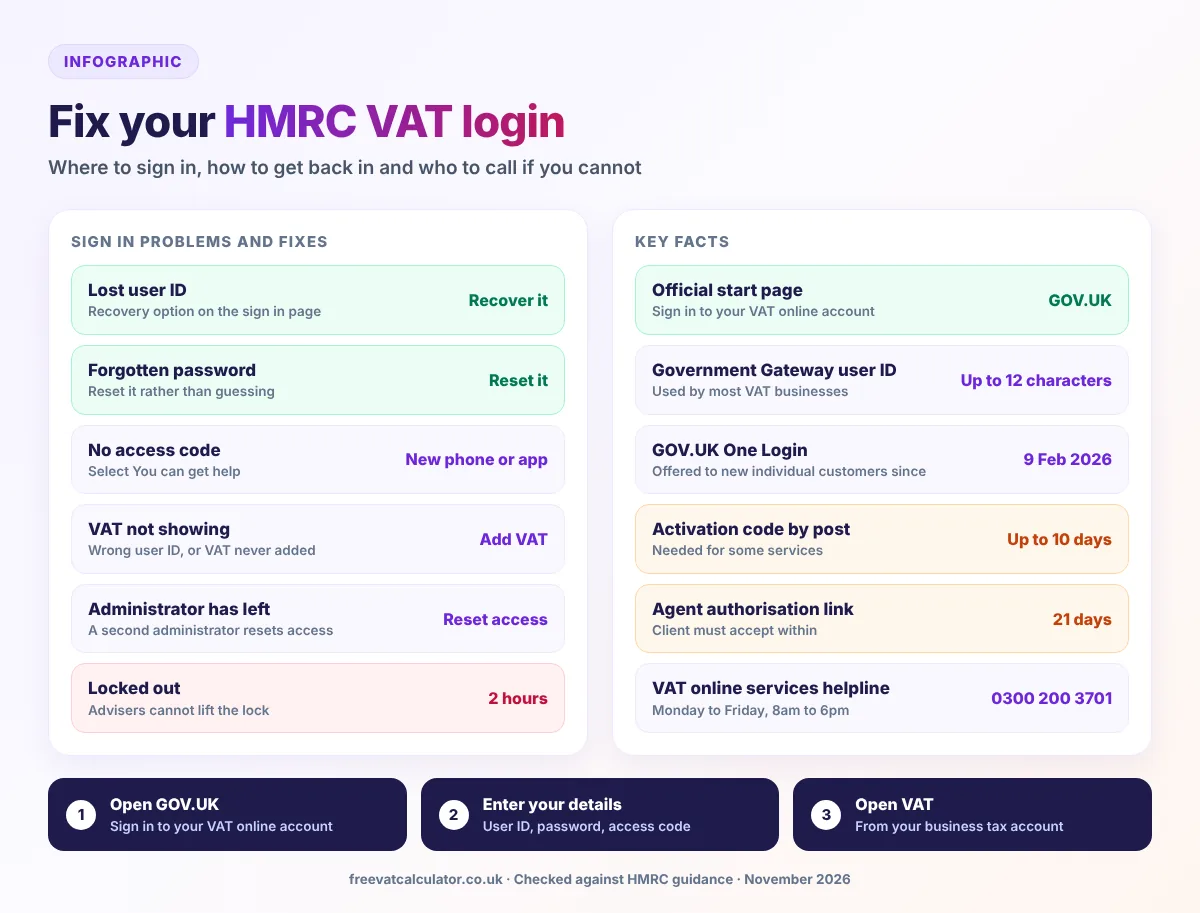
Government Gateway or GOV.UK One Login: which should you use?
HMRC now offers 2 ways to sign in. Government Gateway, often shortened to Gov Gateway, uses a user ID of up to 12 characters and a password, while GOV.UK One Login uses an email address and a password. GOV.UK’s rule is to keep using the HMRC details you already have, even if you hold a One Login from another government service.
| Point | Government Gateway | GOV.UK One Login |
|---|---|---|
| How you sign in | User ID of up to 12 characters and a password | Email address and a password |
| Who uses it for HMRC | Existing HMRC users, including VAT businesses | New individual customers, offered since 9 February 2026 |
| Identity check | You may be asked to confirm your identity | Possibly a new check when you switch, so have a passport or driving licence ready |
| What to do now | Keep using it until HMRC contacts you | Use it only if these are your HMRC details |
When will VAT businesses move to One Login?
HMRC’s February 2026 announcement says existing Government Gateway users need do nothing until they are contacted. Its July 2026 roadmap update aims to move individuals, agents and organisations to One Login by 2030, and says work is still under way on how agents and organisations will switch. Until then, your Government Gateway login remains your HMRC login for VAT.
Proving your identity when you switch
When HMRC asks you to create a One Login, you may have to pass a new identity check, so keep a passport or driving licence to hand. If the check gets stuck, the One Login support team runs a webchat from 8am to 8pm on weekdays.
Setting up your HMRC VAT login for the first time
Registering for VAT and getting into the VAT account are two separate jobs. GOV.UK says you must sign up for a VAT online account as soon as your VAT number arrives by post. If you have not applied yet, our guide on how to register for VAT covers the application.
Create business sign in details
If you have no HMRC details at all, choose Create new sign in details and follow the prompts, which guide you to create a Government Gateway account or GOV.UK One Login details. GOV.UK treats personal, business and agent accounts as separate services, so set up access for the business. Write the user ID down at once, as people often confuse it with their UTR.
Add VAT to your business tax account
Sign in, select Add a tax, duty or scheme, choose VAT and VAT Services, then pick the service you need. You will be asked for details from your registration, so keep your registration letter beside you when you add VAT.
The application reference and activation code
To help protect against fraud, HMRC now asks some businesses for the application reference number they received during VAT registration. Its February 2026 Agent Update advises enrolling VAT as soon as the VAT number arrives. Some services also need an activation code, which HMRC says can take up to 10 days to arrive by post.
Business tax account, VAT online account and personal tax account
These names cause a lot of confusion around the HMRC VAT login. The business tax account is the home page for every business tax you have added, and the VAT online account is its VAT section, so the same user ID opens both. Some people call it their HMRC business account, their online VAT account or my VAT account, but the screens are the same. If you made one set of details for yourself and another for the business, VAT shows only in the account where it was added.
| Account | What it is for | Shows VAT? |
|---|---|---|
| Business tax account | Home page for the business taxes you have added | Yes, once VAT is added |
| VAT online account | Deadlines, payments, penalties, changes and certificate | Yes |
| Personal tax account | Your own tax affairs as an individual | No |
| Agent services account | Tax advisers acting for clients | Only for clients who authorised the agent |
| HMRC app | Personal tax on your phone | Not listed by GOV.UK |
Team members and administrators
An administrator can give team members their own access, so staff never need to share one password. HMRC’s February 2026 Agent Update adds that a second administrator can reset access for a colleague who loses their details or phone.
Does the HMRC app show your VAT?
GOV.UK’s HMRC app page lists only personal features, such as your Self Assessment UTR, so use a browser for VAT. HMRC still aims to reach 10 million app users by March 2027.
What you can do in your VAT online account
Once you log in, the account handles the day to day admin of your registration. GOV.UK lists these tasks.
- See when each VAT return is due
- See when your payment must clear
- View payments and how much you owe
- Set up a Direct Debit to pay VAT
- Check and appeal penalties
- Report changes to your business
- Check that HMRC received your return
- Cancel your VAT registration
The account also holds your registration certificate, and our guide to your VAT certificate online shows where it sits. HMRC’s 2026 roadmap plans an improved VAT repayments tracker too, with first features due during 2026 to 2027.
What you cannot do: send a quarterly VAT return
GOV.UK says the VAT online account cannot take the submission of a quarterly VAT return. Under Making Tax Digital, filing goes through compatible software, and only businesses with an exemption can send a return by post or through the account. After you cancel your registration, though, any remaining returns do go through the VAT online account.
Connecting your MTD software
Software can only file once you grant it authority by signing in, from inside the software, with the details that hold your VAT. You no longer need to sign up for MTD yourself, because HMRC signs up VAT businesses automatically unless they are exempt.
Changes and cancellations
Tell HMRC within 30 days if your business name, address or accountant changes, and give at least 14 days’ notice of new bank details. You can cancel online or by post on form VAT7, and our guide on how to deregister from VAT explains the final return.
Services with a separate sign in
Excise, import and export services, the childcare account and the Capital Gains Tax on UK property account all have separate sign ins. Postponed import VAT statements come from the Customs Declaration Service instead, and each stays available for only 6 months.
Lost user ID, password or phone: how to get back in
Many HMRC VAT login problems come from lost details rather than faults at HMRC. GOV.UK says you can recover or reset lost sign in details, and the sign in page tells you how when you try.
Lost Government Gateway user ID
Search your email first for the message that gave you the user ID. If it is not there, use the recovery option on the sign in page rather than creating new details, because a new user ID will not show your VAT until you add it again.
Forgotten password
Choose the forgotten password option on the sign in page and follow the steps for a password reset. Stop guessing after a couple of failed tries, because too many wrong entries lock you out.
No access code: lost or changed phone
Sign in with your user ID and password, and on the access code screen select You can get help and follow the steps. You may have to confirm your identity before you can add a new phone number or an authenticator app. An app avoids the problem next time, because the codes do not depend on a phone that can leave with a member of staff.
Locked out after too many attempts
Enter the wrong details too many times and you are locked out for 2 hours. The lock lifts on its own, and GOV.UK says helpdesk advisers cannot lift it sooner.
When the person with the login leaves
The classic small business trap is a sole administrator who leaves while the access codes still go to their phone. HMRC advises adding a new administrator before anyone leaves, and if nobody can get in, its online services helpdesk on 0300 200 3600 can reset access after security checks.
Add a second administrator today. It takes minutes and can save days if the only person with the login leaves or loses their phone.
Common HMRC VAT login problems and fixes
These are the problems that come up most often at the VAT account login. Find your symptom in the table, then follow the fix.
| Problem | Likely cause | Fix |
|---|---|---|
| VAT does not appear | Wrong user ID, or VAT never added | Try your other user ID, or add VAT |
| User ID not recognised | A UTR, VAT number or email typed instead | Use the recovery option on the sign in page |
| No access code arrives | Old phone number or no signal | Select You can get help on the code screen |
| One Login does not show VAT | One Login made for another service | Use the HMRC details you already have |
| Software will not connect | Authority not granted, or it has lapsed | Reconnect from inside the software |
| Page loops or shows an error | Session ended, cookies blocked or downtime | Start again from GOV.UK and check availability |
| Asked for an application reference | HMRC’s extra fraud check | Find it in your VAT registration emails and letters |
Check whether the VAT service is down
HMRC keeps a VAT online service availability page that lists planned downtime and known issues, and most planned work falls on evenings or weekends. Online services can also be slow at busy times, so never leave access problems until the day before a deadline.
Agent access: letting your accountant into your VAT
Accountants should never use their client’s own sign in details. They use an agent services account, and the client approves them through what HMRC calls the digital handshake.
For accountants: the agent services account
An agent services account is how tax advisers reach HMRC online services for clients, and it is what people mean by an HMRC VAT agent login. To create one you sign in with the firm’s business Government Gateway details and give, among other things, the firm’s UTR and postcode. Your anti money laundering supervision must already be approved, or HMRC rejects the application.
For clients: accepting the authorisation link
In the agent account, your accountant selects Ask a client to authorise you and sends you a link. Open it, sign in with the details you use for VAT and accept, because GOV.UK says the link expires after 21 days.
Changing or removing your agent
You can remove an agent in your business tax account, and must tell HMRC within 30 days when your VAT accountant changes. HMRC also lists a VAT feature for authorising more than one adviser among its planned work for 2026 to 2027.
Deadlines, payments and penalties to check after you log in
The most common reason to sign in is to check a date or a balance. These are the rules behind the figures your VAT account shows.
| What to check | The rule |
|---|---|
| Return and payment deadline | 1 calendar month and 7 days after the period ends |
| Direct Debit | Set up at least 3 working days before you submit the return; collected 3 working days after the deadline |
| Penalty point threshold | 2 points for annual returns, 4 for quarterly, 5 for monthly |
| At the threshold | A £200 penalty, and another £200 for each further late return |
| Disputing a penalty | Request a review through the VAT online account |
Our VAT return deadlines guide works out your exact dates, and our guide on how to pay VAT covers every method for VAT payments. Whichever you use, the money must clear by the date your account shows.
How to keep your VAT login safe
Anyone with your VAT sign in can change your repayment bank details or your address, so treat it like a bank login. These habits keep it safe.
- Sign in only from GOV.UK, never from an email link
- Keep your HMRC VAT login details to yourself
- Give each member of staff their own access
- Keep at least two administrators
- Use an authenticator app for access codes
- Never read an access code out to a caller
HMRC says its texts never ask for personal or payment information, and its emails asking for such details come only from addresses ending in hmrc.gov.uk. Forward suspicious emails to phishing@hmrc.gov.uk and texts to 60599.
Who to contact when you still cannot sign in
Phone HMRC only after the online recovery steps fail, and pick the right line, because the general online services helpdesk does not handle VAT online services. Both phone lines below open Monday to Friday, 8am to 6pm, and close on bank holidays.
| Problem | Who to contact | Details |
|---|---|---|
| VAT online account access | VAT online services helpdesk | 0300 200 3701, or +44 2920 501 261 from abroad; less busy 8.30am to 11am |
| Other HMRC online services, or no administrator left to reset access | Online services helpdesk | 0300 200 3600, or +44 161 930 8445 from abroad |
| GOV.UK One Login problems | One Login support team | Webchat on weekdays from 8am to 8pm, or a form answered by email within 2 days |
| Quick questions | HMRC digital assistant | Online, with a transfer to an adviser on webchat if one is free |
For Relay UK, dial 18001 before either number. The online services helpline also helps if a health condition, disability or personal circumstance makes online services hard to use. For VAT questions, our HMRC contact numbers guide lists the VAT helpline and every other line.
Registered and filing VAT?
Our free VAT calculator adds or removes VAT at 20% or 5% and shows the working, so the figures you file add up.
HMRC VAT login FAQs
These are the questions people ask most when they cannot get into their VAT account. Each answer reflects GOV.UK guidance checked on 11 November 2026.
Can I use GOV.UK One Login for VAT?
Only if those are the HMRC sign in details you already use, or HMRC has asked you to switch. Most VAT businesses still sign in with a Government Gateway user ID, and HMRC will contact you when it is your turn to move.
Why can’t I see VAT in my business tax account?
Usually you have signed in with a different user ID from the one that holds VAT, or VAT was never added. Try your other details first, then add VAT through Add a tax, duty or scheme, with your application reference if HMRC asks for it.
Can I submit my VAT return in the online account?
Not a normal quarterly return. Returns go through software compatible with Making Tax Digital, unless HMRC has given you an exemption or your registration has been cancelled.
Is the old HMRC VAT portal still available?
Some people still call it e VAT or the VAT portal, but today it is the VAT online account inside your business tax account. Start from GOV.UK, which passes you to HMRC’s tax.service.gov.uk service once you sign in.
You now have the official sign in page, a fix for each kind of lockout and the right contact if none of them works. Keep a second administrator and an authenticator app in place, and your HMRC VAT login should never stand between you and a deadline again.
Sources: GOV.UK and HMRC: VAT online account; HMRC sign in; Problems signing in; One Login news; One Login guidance; HMRC roadmap 2026; Agent Update 140; Register for VAT; Business tax account; HMRC app; Send a VAT Return; Changing details; Cancel registration; Postponed VAT statements; Service availability; Agent services account; Digital handshake; Authorise an agent; VAT Returns; Direct Debit; Late submission penalties; Suspicious contact; VAT online services helpdesk; Online services helpdesk; One Login support. This page is general information, not tax advice.